

Bed30321077z973
Inspiring
February 4, 2024
Answered

How to handle different values of fps, when your video is x1 fps, your sequence x2 fps, TICKS, etc?

  • February 4, 2024
  • 1 reply
  • 383 views

Hello,

So here is my configuration:

- A sequence that has 25 FPS

- A video that has 30 FPS

- and Some Audios
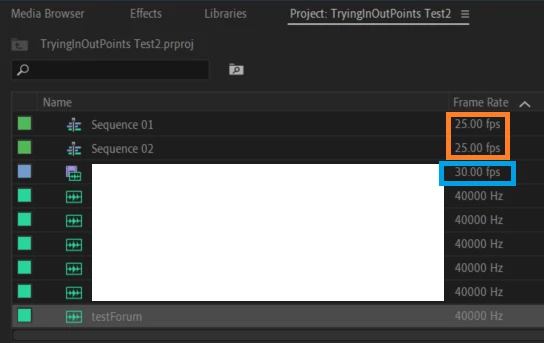


Ok then HOW to obtain the FPS value without looking at the UI?

I tried:

Item.getFootageInterpretation().frameRate;

Results:

- Sequences: 2.75404699046078e-8

- (Audios): 2.75404699046078e-8

- Video: 30 FPS (CORRECT).
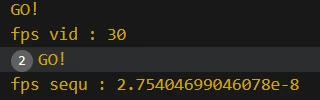
 

The problem is as you can see my sequence here is actually 25 FPS (cf screenshot), and I have No method to obtain its actual FPS,


or......................... is there?


Edit:

I am not sure how the sequence FPS is "set" from the beginning? So I am not sure how to "predict" its value.

This topic has been closed for replies.
Correct answer Bruce Bullis

It's impossible to comment on the behavior you've described without seeing your ExtendScript code. 

Here is PProPanel successfully getting and setting frame rate.

1 reply

Bruce Bullis
Bruce BullisCorrect answer
Legend
February 4, 2024

It's impossible to comment on the behavior you've described without seeing your ExtendScript code. 

Here is PProPanel successfully getting and setting frame rate.

Bed30321077z973
Inspiring
February 4, 2024

I obtain first the items in a collection of project items.

Then get the item in the variable "item", then:


$.writeln("GO!");
if (Item.name=="Sequence 01") {
        var fps = Item.getFootageInterpretation().frameRate; // 
        $.writeln("fps sequ : "+fps); //Will show 2.75404699046078e-8
}
if (Item.name=="myvideoname.mp4") {
        var fps = Item.getFootageInterpretation().frameRate; //
        $.writeln("fps vid : "+fps); //will show 30
}


Ok thank you for the link, seems much more advanced than anything I was writing, will make sure to back to it, as for now I am closing in a project involving in point and out points, without using the FPS. (When that's finished I will try to use what you showed me "elsewhere", to finish everything up.)