Participant
December 12, 2018
Answered

How to Install Premiere CC 12.1.2 and keep Premiere CC 2015?

  • December 12, 2018
  • 1 reply
  • 4517 views

Hello I'm trying to install the new version of Premiere but in Creative Cloud panel the advanced update options window doesn't show up. It does with Photoshop but not for Premiere.

Since i don't have Windows 10 i need to keep the older version of Premiere, the new one has audio issues working with Windows 8.

I read that "You can't have multiple dot versions installed.  You'll have to choose only one version of 12", but what about to keep version 9 and have also version 12?

Is it possible to keep the old version or i have to reinstall it after installing the new one?

If i reinstall version 9 I still have the codecs to read dolby files?

Thanks
    This topic has been closed for replies.
    Correct answer Ann Bens

    New version (2019) will only operate under W10.

    If you dont haveW10 you wont be able to install.

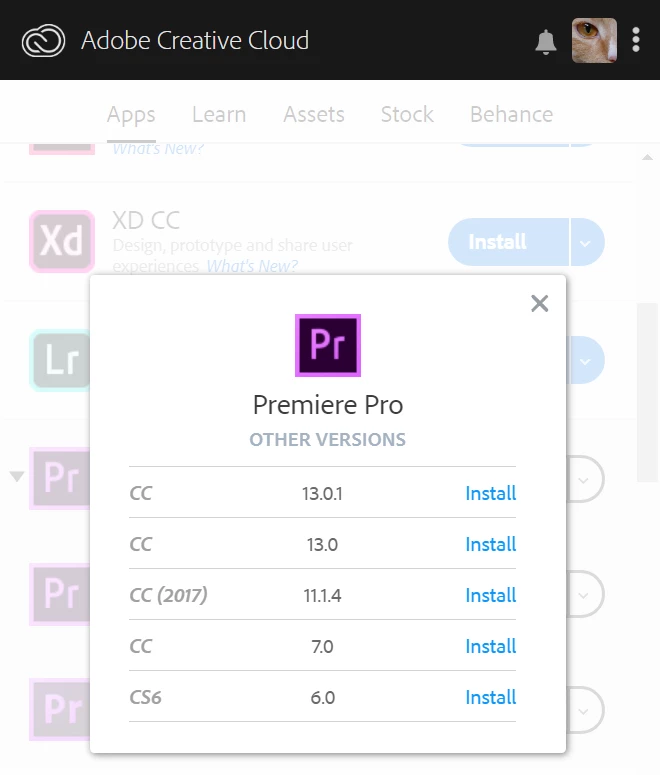
    This is what is available.

    13.0.2. and 12.1.2 dont show show in this list as its already installed on my machine.

    1 reply

    Ann Bens
    Community Expert
    Ann BensCommunity ExpertCorrect answer
    Community Expert
    December 12, 2018

    New version (2019) will only operate under W10.

    If you dont haveW10 you wont be able to install.

    This is what is available.

    13.0.2. and 12.1.2 dont show show in this list as its already installed on my machine.

    Participant
    December 12, 2018

    I would like to install the version 12 and keep the version 9 on PC. Is it possible?

    Ann Bens
    Community Expert
    Community Expert
    December 12, 2018

    Yes you can install version 12. Make sure you uncheck in the advanced setting Remove older versions.