How to KEEP PIXELS when exporting my video?
I’m making a pixel art video, so I definitely want hard edges on pixels. However, Premiere Pro likes blurring them all when I export the video (and also some in preview). Moreover, I have a Pixel font as well.
My Pixels Sprites are sized for a 640x480 screen size.
Now, look at the image below. Do you see those shadows around “SCH”, “LV 1” and “HP”? They are awful. Do you see that red ribbon? Well, it looks different from the original one (second photo below). Do you see that ugly yellow shadow on the health bar? Horrible! On the other hand, the feet on the top are totally ok.
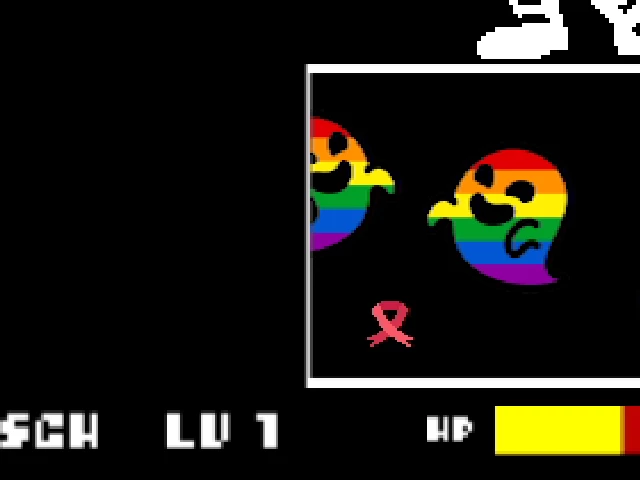

The texts have not been scaled up and the yellow bar was made in Premiere Pro itself with the Rectangle tool.
What did I try?
1) AVI Uncompressed UYVY 422 8bit
2) AVI Codec Intel IYUV
3) H.264
And I can’t see any noticeable difference. Maybe H.264 is the worse. I’m using 2018 Premiere Pro. It’s the first time that I tried to make a pixel art animation and I really do not know which export settings to pick. Actually, I have the same problem even in preview (except for the red ribbon, which looks great). Many thanks to the ones are gonna help me 🙂
Note: I've already checked https://www.reddit.com/r/premiere/comments/6awbo7/help_how_to_fix_blurry_titles_with_pixel_font/
https://www.reddit.com/r/premiere/comments/h09mnu/premiere_wont_export_pixel_perfect_even_if/
Here's a suggestion I got:
<<You’re seeing the effects of chroma sub sampling.
Export your video to a video with 4:4:4 subsampling, such as ProRes 4444 or QuickTime Animation.
Upscale it in another application 2x, 4x, 8x etc using nearest neighbour scaling.>>
But I don't see any ProRes 4444 and, when I try to export to QuickTime Animation, I just got the audio without the video (both the boxes "export video" and "export audio" are ticked).
 AdChoices