
Participant
September 6, 2020
Answered

How to make multiple tracks into one single track?

  • September 6, 2020
  • 1 reply
  • 1247 views

I have un-overlapped tracks in a sequence like this;
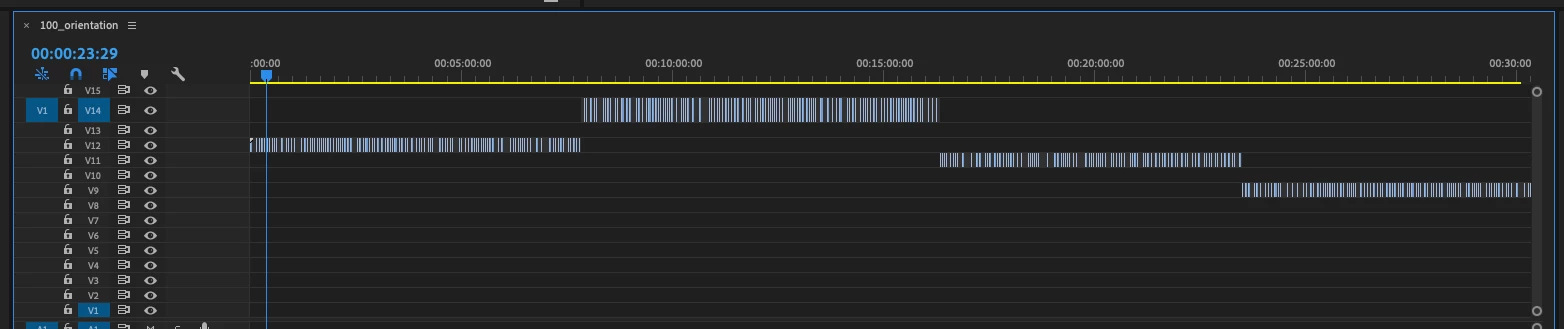


What I want to do is to merge them in one track of sequence. Is there any easy way to do this except manually dragging and dropping and aligning them?

This topic has been closed for replies.
Correct answer Steve Griffiths

Select all the clips in one track at a time (click and drag around the clips to select them). Then hold the 'alt' key (or option key on Mac) and then press the down arrow key on your keyboard. The selected clips will move down to the next layer for each press of the arrow key. Do this to each group of clips to get them all to the same layer.

1 reply

Steve GriffithsCorrect answer
Inspiring
September 6, 2020

Select all the clips in one track at a time (click and drag around the clips to select them). Then hold the 'alt' key (or option key on Mac) and then press the down arrow key on your keyboard. The selected clips will move down to the next layer for each press of the arrow key. Do this to each group of clips to get them all to the same layer.

chois5E95Author
Participant
September 6, 2020

Thanks! You saved my time! It works perfectly