

Todd_Morgan
Legend
March 23, 2026
Question

How to make two audio channels from clip/source to be one track?

  • March 23, 2026
  • 3 replies
  • 52 views

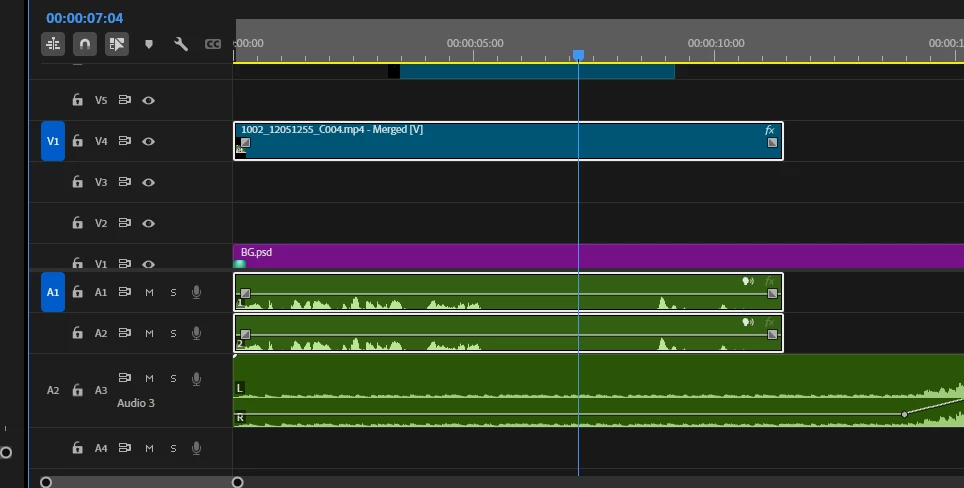
I have a merged source where I have combined audio track with video (due to studio outputting wrong/bad files) and using these merged sources in my edit. I have just noticed that these new clips have separate tracks (L/R) where if I need to edit volume I have to do it to both audio tracks. But another video source (see image below) one track has L/R. How do I change the audio tracks for A1 and A2 to be like A3 in one track only?
 

    3 replies

    Ann Bens
    Community Expert
    Community Expert
    March 23, 2026

    In the Preferences > Timeline there is a setting for Default Audio Tracks.

    This setting will let you set the way you want your audio to appear on the timeline.

    Must be set before file import into Premiere.

    (not sure if this also applies to merged clips as well: never use them).


    Todd_Morgan
    Legend
    March 23, 2026

    I guess I am looking for a solution that can apply to a project already well into edit - without having to start from scratch.

    Community Expert
    March 23, 2026

    @Todd_Morgan As I said below, you can’t make a merged clip and keep the audio stereo (an Adobe engineer can correct this if it’s wrong, but I'm quite confident this is how merged clips work). 

    So the question still stands as to what these audio channels are and why you want these as stereo. If this is an interview or vo mono is all you need. 

    Todd_Morgan
    Legend
    March 23, 2026

    I am unable to edit my post, but FYI A3 is my music track - in stereo - in one track. The merged source where audio takes up two tracks, was originally a video source with stereo one track audio, and my wav file also one track stereo. When merged, the outcome is a file that contains two tracks, L and R. So how they got separated into two boggles the mind.


    Community Expert
    March 23, 2026

    What you're looking at here is both dual mono audio and stereo audio. Premiere attempts to interpret audio when clips are imported properly as mono or stereo, but it doesn't always get that right. You can go back to the clip in the bin that’s mono > Right click > modify > audio channls and there, change the audio mapping to stereo or vice versa. This only affects the clip in the bin, so you usually have to go back and re-edit those clips into the timeline. 

    Todd_Morgan
    Legend
    March 23, 2026

    ugh - this needs to be addressed in the next update...

    Community Expert
    March 23, 2026

    I'm not sure what there is to address, as this is pretty standard workflow. There are certainly times when you want mono versus stereo for a variety of reasons. 

    If you had a stereo clip that should be dual mono, such as an interview recorded with one lav and one boom mic, you can right click those clips in the timeline and change the audio and choose one channel over the other, and then put the clips in a mono audio track but you may be stuck with having to re-edit the ups and the timelines. This can go pretty quick if you don't have many clips, as you can just change the channel configuration in the bin and then match frame and overwrite, so it's just a couple of key strokes