
Known Participant
February 17, 2023
Answered

How to not cover the clip in the sequence when i insert or paste new clips into timeline?

  • February 17, 2023
  • 2 replies
  • 628 views

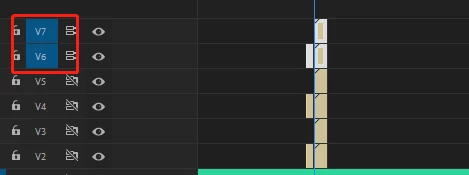
Recently i am working on a cep which can insert adjustment layer from another project,now the issue is ,when i use the insertclip() function it will always overlap the clip,and i write a very complex code to judge if it can be insert into the specific track;(but it can only insert,not paste)but when i search for other extensions,i found that they do this thing to aviod the issues happened;But i really do not know its function,so can i get your help?Thank you so much!


what i want to do is judge clips.length or somthing like this,if it not = 0,i will not chose that one as a target,so i can paste to the target track.
This topic has been closed for replies.
Correct answer Bruce Bullis

You know what track to which you want to add the adjustment layer. 

Given that, you can walk across the trackItems in that track, and confirm the presence of trackItems at a given time. 

Doesn't that give you what you need?

2 replies

Bruce Bullis
Bruce BullisCorrect answer
Legend
February 17, 2023

You know what track to which you want to add the adjustment layer. 

Given that, you can walk across the trackItems in that track, and confirm the presence of trackItems at a given time. 

Doesn't that give you what you need?

R Neil Haugen
Legend
February 17, 2023

When you're working from the Source monitor using Insert or Overwrite, they supposedly operate slightly differently.


If the timeline CTI/playhead is at a cut point, Insert will drop the clip on the track with the left-side Source blue target set active as shown in your image. And will push existing clips to the right.


Overwrite, no matter where  the playhead is set, will ... overwrite ... what's on the track with the Source target set.


Neil

Everyone's mileage always varies ...