


Participating Frequently
September 2, 2013
Answered

How to Open .CFA Files

  • September 2, 2013
  • 8 replies
  • 55107 views

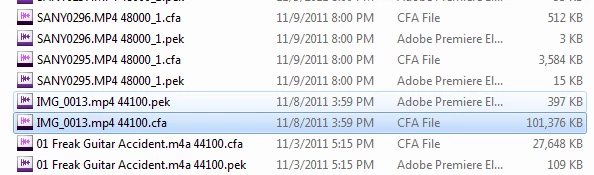
Hi all, I've been looking on my hardrive for some old files, and found at least what I think is the audio portion. They're all .CFA and .PEK files. But I'm assuming the .CFA has the bulk of the data because of the size.

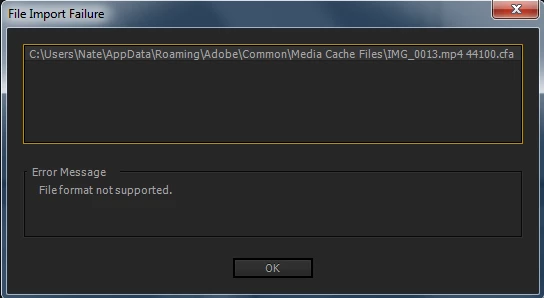
I thought that Premiere Pro would be able to open the files, but it seems not. I've also tried Media Encoder, Premiere Elements, and Encore, but still nothing. Below is my process and error. Any help appreciated thanks!

The location of all these files: C:\Users\Nate\AppData\Roaming\Adobe\Common\Media Cache Files
Trying to import into Premiere Pro
Correct answer Steven L. Gotz

There is nothing of value to you in the CFA files. You can feel free to delete them, and when you go to use the original audio files, the CFA files will be recreated. The same with the PEK files. They are supposed to be temporary files that help Premiere Pro play back files in the timeline without having to render the audio constantly.

If you were hoping to recover lost media files, that is not going to happen by using CFA files.

8 replies

Participant
August 21, 2026

I know this is 12 years old, but for those who are facing this challenge I was able to successfully recover an audio from the .cfa file I had. On my attempt I had the same output as ​@andys98318584 : the result was the correct length and pitch but in my case the file wasn't contiguous, and there were duplicate pieces of audio inserted all over the place. Than I figured out a pattern.
Premiere stores channels PLANAR: a block of N samples of the left channel, then the same N samples of the right channel, then the next block of left, and so on. Standard audio interleaves channels sample by sample, so every tool reading the file assumes the wrong layout. On a near-mono recording the two channels are nearly identical, so you hear each passage twice.
I asked an IA to assist me with a tool, I’m sending it here if anyone needs:

#!/usr/bin/env python3
"""
cfa2wav - Recover audio from Adobe Premiere / After Effects .cfa cache files.

WHY THIS EXISTS
---------------
A .cfa ("Conformed Audio") file is the uncompressed cache Premiere writes when
you import compressed audio. If you lose the original mp3/m4a, the .cfa still
holds the full audio - but no player opens it, and importing it as raw data
produces audio where every phrase repeats.

The repetition is not corruption. Premiere stores channels PLANAR: a block of
N samples of the left channel, then the same N samples of the right channel,
then the next block of left, and so on. Standard audio interleaves channels
sample by sample, so every tool reading the file assumes the wrong layout. On
a near-mono recording the two channels are nearly identical, so you hear each
passage twice.

This tool detects the block size and channel layout from the file itself and
rewrites the samples in the correct order. No samples are discarded.

WHAT IT ASSUMES
---------------
* 32-bit float samples, little-endian (Premiere's internal format)
* No file header - audio starts at byte 0
* Leading zeros in the file are digital silence, not padding

USAGE
-----
python cfa2wav.py file.cfa one file
python cfa2wav.py *.cfa several files
python cfa2wav.py -d /path/to/media-cache a whole folder, recursively
python cfa2wav.py file.cfa --rate 44100 override the sample rate
python cfa2wav.py file.cfa --mp3 also write an mp3 (needs ffmpeg)

SAMPLE RATE
-----------
Premiere usually appends the rate to the filename, e.g. "Song_48000.cfa", and
that is used automatically. Be aware it can reflect the sequence rate rather
than the source rate. If the result sounds sharp and rushed, or flat and
dragging, re-run with --rate and the other common value (44100 or 48000).
Your ear is the authority here; the number in the filename is only a hint.

Requires: numpy. Optional: ffmpeg, for --mp3.
License: public domain (CC0). Do whatever you like with it.
"""

import argparse
import re
import shutil
import subprocess
import sys
import wave
from pathlib import Path

try:
import numpy as np
except ImportError:
sys.exit("This script needs numpy. Install it with: pip install numpy")


# Block sizes to consider, in samples. Premiere uses powers of two.
CANDIDATE_BLOCKS = [4096, 8192, 16384, 32768, 65536, 131072, 262144]

# Rates considered plausible when guessing from the filename.
KNOWN_RATES = {8000, 11025, 16000, 22050, 32000, 44100, 48000, 88200, 96000, 192000}


# ----------------------------------------------------------------------------
# Detection
# ----------------------------------------------------------------------------

def rate_from_name(path):
"""Premiere appends the conform rate to the filename, e.g. Song_48000.cfa"""
for token in re.findall(r"\d{4,6}", path.stem):
value = int(token)
if value in KNOWN_RATES:
return value
return None


def block_score(samples, block):
"""
Score a candidate block size for the planar-stereo hypothesis.
Returns (score, phase).

If the layout really is [L block][R block][L block]... then blocks pair up:
block 0 with 1, block 2 with 3, and each pair covers the SAME instant in
two channels, so it correlates very highly. The pairs that STRADDLE a
boundary - block 1 with 2, block 3 with 4 - are different moments in time
and correlate around zero.

So the two parities must be scored separately. Averaging them together
mixes a ~1.0 with a ~0.0 and lands near 0.5 for every candidate, which
tells you nothing. A plain mono file scores near zero on BOTH parities.
"""
if samples.size < block * 8:
return -1.0, -1.0, 0

total = (samples.size // block) * block
grid = samples[:total].reshape(-1, block)
n = grid.shape[0]
if n < 8:
return -1.0, -1.0, 0

# Skip the outer edges, where leading and trailing silence would make the
# correlation meaningless. Step by 2 to stay within one parity.
lo, hi = int(n * 0.2), int(n * 0.8) - 1
step = max(2, ((hi - lo) // 40) * 2)

by_phase = {}
for phase in (0, 1):
scores = []
start = lo + ((lo + phase) % 2)
for i in range(start, hi, step):
a, b = grid[i].astype(np.float64), grid[i + 1].astype(np.float64)
if a.std() < 1e-9 or b.std() < 1e-9:
continue
scores.append(abs(float(np.corrcoef(a, b)[0, 1])))
by_phase[phase] = float(np.median(scores)) if scores else -1.0

best_phase = max(by_phase, key=by_phase.get)
return by_phase[best_phase], by_phase[1 - best_phase], best_phase


def detect_layout(samples):
"""
Return (channels, block, phase, confidence).

channels == 2 means planar stereo with the given block size.
channels == 1 means the samples are already in playable order.
"""
results = []
for block in CANDIDATE_BLOCKS:
# The file must divide evenly into blocks; Premiere pads the last one.
if samples.size % block != 0:
continue
matched, straddled, phase = block_score(samples, block)

# The paired parity must correlate strongly AND the straddling parity
# must not. Demanding that contrast is what separates real planar
# stereo from merely repetitive mono music, where a loop can make
# distant blocks resemble each other on BOTH parities.
if matched >= 0.80 and (matched - straddled) >= 0.30:
results.append((matched - straddled, matched, block, phase))

if not results:
return 1, 0, 0, 0.0

# Prefer the largest block among near-equal contrasts: a true block size
# of 65536 also scores at 32768, since half of a matching pair still
# matches. The largest one is the real boundary.
best = max(results)[0]
finalists = [r for r in results if r[0] > best - 0.05]
_, matched, block, phase = max(finalists, key=lambda r: r[2])

return 2, block, phase, matched


# ----------------------------------------------------------------------------
# Conversion
# ----------------------------------------------------------------------------

def deinterleave(samples, block, phase=0):
"""Rebuild interleaved stereo from planar blocks."""
grid = samples.reshape(-1, block)
if phase:
# Pairing starts one block in; the leading block has no partner.
grid = grid[phase:]
left = grid[0::2].reshape(-1)
right = grid[1::2].reshape(-1)

# An odd number of blocks leaves one channel a block longer; trim to match.
n = min(left.size, right.size)
left, right = left[:n], right[:n]

out = np.empty(n * 2, dtype=np.float32)
out[0::2] = left
out[1::2] = right
return out, n


def write_wav(path, samples, channels, rate):
peak = float(np.abs(samples).max()) or 1.0
if peak > 1.0:
samples = samples / peak
print(f" peak was {peak:.3f}; scaled down to avoid clipping")

pcm = (np.clip(samples, -1.0, 1.0) * 32767.0).astype("<i2")
with wave.open(str(path), "wb") as w:
w.setnchannels(channels)
w.setsampwidth(2)
w.setframerate(rate)
w.writeframes(pcm.tobytes())


def convert(path, out_dir, forced_rate=None, make_mp3=False):
print(f"\n{path.name}")

raw = np.fromfile(path, dtype="<f4")
if raw.size == 0:
print(" empty file, skipped")
return False

# Premiere writes 32-bit float; anything wildly outside +/-1 means the
# assumption is wrong and the output would be noise.
finite = raw[np.isfinite(raw)]
if finite.size == 0 or np.abs(finite).max() > 8.0:
print(" does not look like 32-bit float audio, skipped")
print(" (this may be a Quick Heal archive or a Bluetooth log,")
print(" which also use the .cfa extension)")
return False

rate = forced_rate or rate_from_name(path) or 48000
source = "given" if forced_rate else ("filename" if rate_from_name(path) else "default")

channels, block, phase, confidence = detect_layout(raw)

if channels == 2:
samples, frames = deinterleave(raw, block, phase)
print(f" planar stereo, block {block} samples (confidence {confidence:.3f})")
else:
samples, frames = raw, raw.size
print(f" mono / already interleaved (confidence {confidence:.3f})")

duration = frames / rate
print(f" {rate} Hz from {source} -> {int(duration // 60)}:{duration % 60:04.1f}")

out_dir.mkdir(parents=True, exist_ok=True)
wav_path = out_dir / (path.stem + ".wav")
write_wav(wav_path, samples, channels, rate)
print(f" wrote {wav_path.name}")

if make_mp3:
if shutil.which("ffmpeg"):
mp3_path = out_dir / (path.stem + ".mp3")
subprocess.run(
["ffmpeg", "-hide_banner", "-loglevel", "error", "-y",
"-i", str(wav_path), "-codec:a", "libmp3lame", "-b:a", "192k",
str(mp3_path)],
check=False,
)
print(f" wrote {mp3_path.name}")
else:
print(" ffmpeg not found, skipped mp3")

return True


# ----------------------------------------------------------------------------

def main():
parser = argparse.ArgumentParser(
description="Recover audio from Adobe Premiere .cfa cache files.",
epilog="If the pitch sounds wrong, re-run with --rate 44100 or --rate 48000.",
)
parser.add_argument("files", nargs="*", help=".cfa files to convert")
parser.add_argument("-d", "--dir", help="convert every .cfa found under this folder")
parser.add_argument("-o", "--out", default="cfa_recovered", help="output folder")
parser.add_argument("--rate", type=int, help="force the sample rate")
parser.add_argument("--mp3", action="store_true", help="also write mp3 (needs ffmpeg)")
args = parser.parse_args()

targets = [Path(f) for f in args.files]
if args.dir:
targets += sorted(Path(args.dir).rglob("*.cfa"))

targets = [t for t in targets if t.is_file()]
if not targets:
parser.print_help()
return

out_dir = Path(args.out)
print(f"{len(targets)} file(s) to convert -> {out_dir.resolve()}")

done = sum(convert(t, out_dir, args.rate, args.mp3) for t in targets)

print(f"\nConverted {done} of {len(targets)}.")
if done:
print("Listen before you delete anything. If the pitch is off, re-run")
print("with --rate set to the other common value.")


if __name__ == "__main__":
main()


SigitySym
Participant
June 18, 2015

...we've been in this same boat a few times.  If your content is audio only you may have luck renaming the file .PCM, then open the file with an audio tool like Adobe Audition and use the settings associated with the original to open, example 32bit Float, 44.1 sample.

To Attempt to Recover Audio...

1. Rename .CFA to .PCM

2. Open .PCM in Audition and provide the compression specifications, example 32bit Float 44.1 sample rate.

Inspiring
March 8, 2017

I thought I'd just add to this thread as I've seen many question in this regard and wanted to report the result of applying SigitySym's advice above. My Dad had lost a .wav file for which he had the corresponding CFA file. I followed the two steps above. I picked another .wav file Dad had and used the Source Audio Format from that. The result was the correct length and pitch but in my case the file wasn't contiguous, and there were duplicate pieces of audio inserted all over the place. However, once I found and chopped them out of the wave form I got something pretty near to the original piece.

Thanks for the hint SigitySym.

the_wine_snob
Inspiring
September 2, 2013

In addition to Steven's comments, you can see this article for more background on the CFA and PEK files: http://forums.adobe.com/message/3892177#3892177

Sorry that those will not be of help, but good luck on locating the original Assets.

Hunt

Steven L. Gotz
Steven L. GotzCorrect answer
Inspiring
September 2, 2013

There is nothing of value to you in the CFA files. You can feel free to delete them, and when you go to use the original audio files, the CFA files will be recreated. The same with the PEK files. They are supposed to be temporary files that help Premiere Pro play back files in the timeline without having to render the audio constantly.

If you were hoping to recover lost media files, that is not going to happen by using CFA files.

artofzootography.com
Participating Frequently
September 2, 2013

Thanks guys. Good to know. I thought that they actually contained stuff I could get out. I recently lost 900 GB on my external and was hoping they would be an alternative. :/

Participant
December 22, 2023

I have the same issue here. I was looking for old family videos which were deleted and now I can't get them back. Tried searching and I only came across the CFA files .