
menopreciado
Participant
May 3, 2015
Answered

how to organize clips in sequential order

  • May 3, 2015
  • 3 replies
  • 70376 views

How does one organize clips in sequential order in Adobe Premiere Pro CC?

I import the clips and they are numerically numbered but appear in random clusters within 1 folder?

I do not wish to create bins, i want to see my footage in the order that i shot it in.

thanks!
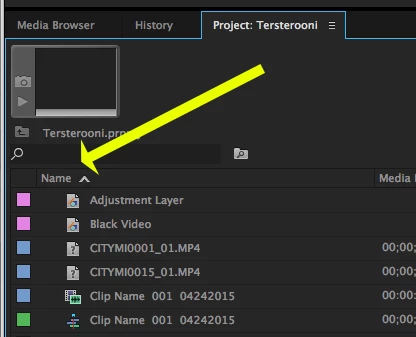
Correct answer Meg The Dog

In the Project Panel, click on "Name" to sort.  Click again to reverse the sort.

MtD

3 replies

Participant
October 11, 2018

I wanted to sort 77 clips by created date. Pr does not have a column for created date and the modified date was not in order. This was wedding footage so at first I was discouraged but clever thinking I ordered them in Windows by 'Date' which is the original created date and then copied everything to another folder. Windows copy goes in the current order and therefore it put my modified date in the order I wanted. From there, I just copied the files into Pr and ordered by modified date.

Kevin-Monahan
Community Manager
Community Manager
December 12, 2019

Nice job, Ado. Here is the method that I use and recommend. You just need to add the proper metadata column.


Thank You,
Kevin

Kevin Monahan - Sr. Community and Engagement Strategist – Adobe Pro Video and Audio
Participant
December 19, 2019

wow thanks this helps a lot~!


medhadeepb
Participant
August 13, 2016

That is for the list view. For Thumbnails view, There is a small button. Please refer the following image

harrisonw27731475
Participant
February 8, 2018

Sort the files chronologically in your windows file view then rename all the files with a common name like 2014 then they will appear in numerical and chronological order

Legend
May 3, 2015

You might have to create bins if you have more than one card's worth of shots.  Otherwise you'll end up with multiple clips with the same name and no way to sort them sequentially.

menopreciado
Participant
May 3, 2015

Just want to organize 1 set of files in sequential order from the same camera and same card. No need to make bins, since its only 1 folder

shooternz
Legend
May 3, 2015

A folder is a bin if its in the Project Window.

BIN is a traditional filmmaking / editing term.