

mohamedh78426672
Known Participant
February 9, 2021
Question

how to put photoshop file above video?

  • February 9, 2021
  • 2 replies
  • 386 views


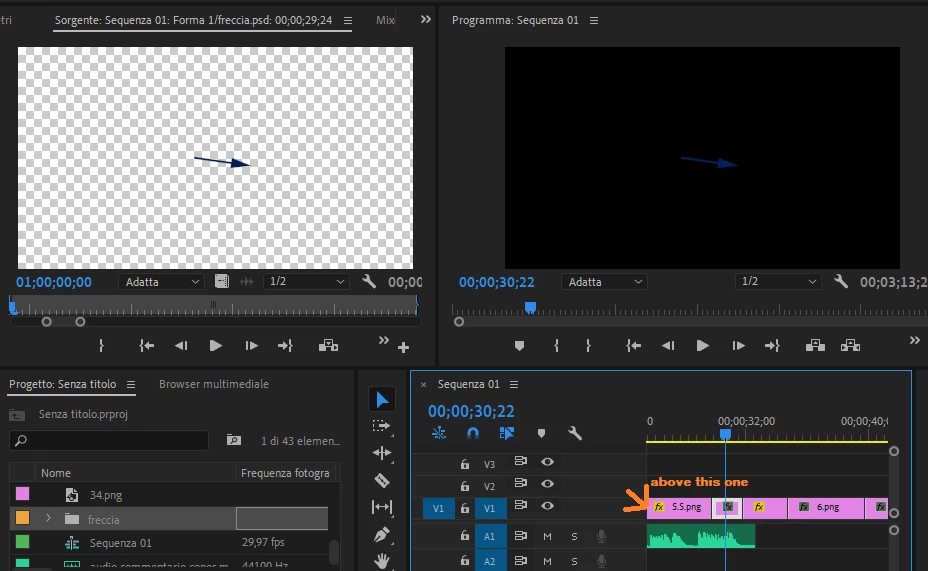
Hello guys i want to put this arrow above a sequence, not within the sequence, i dragged the PS file into the timeline and it turned part of the sequence, but this is not what i wanted, when i try to remove it it leaves a space in the sequence..


how can i remove it without leaving a blank space and put it above the video? 


thank you
This topic has been closed for replies.

2 replies

R Neil Haugen
Legend
February 9, 2021

You can't put things "above" a sequence ... all tracks within that one timeline panel are on the same sequence.


So ... you want that on a higher TRACK ... put it on V2. Anything on a higher track 'replaces' the lower track where it 'exists' I suppose you can say. If that arrow is on a background that is only an "alpha" channel (as it looks like it might be) then it will be "clear" except for the arrow and the lower track will show through fine.


Neil

Everyone's mileage always varies ...
mohamedh78426672
Known Participant
February 10, 2021


ok i understand now thank you

Community Expert
February 9, 2021

Click and hold the video clip and move it to the track above that video.

mohamedh78426672
Known Participant
February 10, 2021


ok it worked thank you! How can i fill that gap now without moving the sequence one at the time?

Christian.Z
Community Expert
Community Expert
February 19, 2021

Either select all the clips and move them, or right click in the gap and ripple delete