
Participant
November 2, 2021
Answered

How to remove an effect from 50 clips

  • November 2, 2021
  • 2 replies
  • 558 views

Good evening.
I created an effect that I copied and pasted from a special effect on 50 clips in my timeline.
Finally, I no longer want this effect.
How do I remove this effect from my 50 clips, from 20 different movies without having to do it one by one?
Thanks for your help

This topic has been closed for replies.
Correct answer Averdahl
quote

How do I remove this effect from my 50 clips, from 20 different movies without having to do it one by one?


By @frédérich87733110


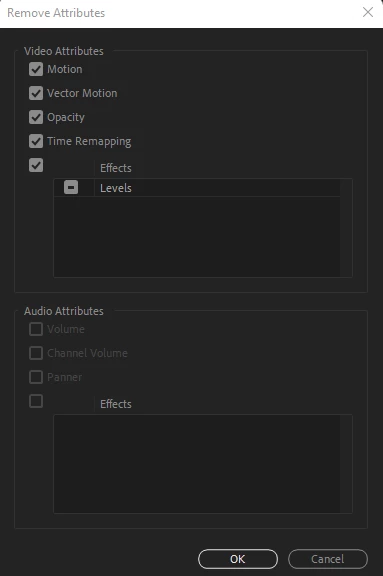
Select all clips (Ctrl+A) on the Timeline and go to Edit > Remove Attributes and select what to remove and what to keep.


Oops, ah.photo were faster. 🙂

2 replies

Averdahl
Community Expert
AverdahlCommunity ExpertCorrect answer
Community Expert
November 2, 2021
quote

How do I remove this effect from my 50 clips, from 20 different movies without having to do it one by one?


By @frédérich87733110


Select all clips (Ctrl+A) on the Timeline and go to Edit > Remove Attributes and select what to remove and what to keep.


Oops, ah.photo were faster. 🙂

Participant
November 2, 2021

Hello.

Really simple !!

Thx ah.photo 😉

Inspiring
November 2, 2021

@frédérich87733110 


Select all of the clips, Right Click > Remove Attributes.

Or something like that, I don't have Premiere in front of me admittedly. But yes, you can bulk remove effects from clips