Inspiring
April 10, 2020
Answered

How to remove pauses in a voice over but leave video unchanged?

  • April 10, 2020
  • 1 reply
  • 1129 views

I have a short video with a separately recorded voice over (someone explaining an idea). The video part looks fine, but I need to clean up the audio by removing some pauses, hmmm's etc .

I have the audio in the timeline but there's no way I can find to clip pieces out of the audio and not have the video clipped out too...? Nothing needs to synch up here but I can't seem to figure out how to edit only the audio...!!

Thanks for any input!

Alan.
This topic has been closed for replies.
Correct answer Meg The Dog

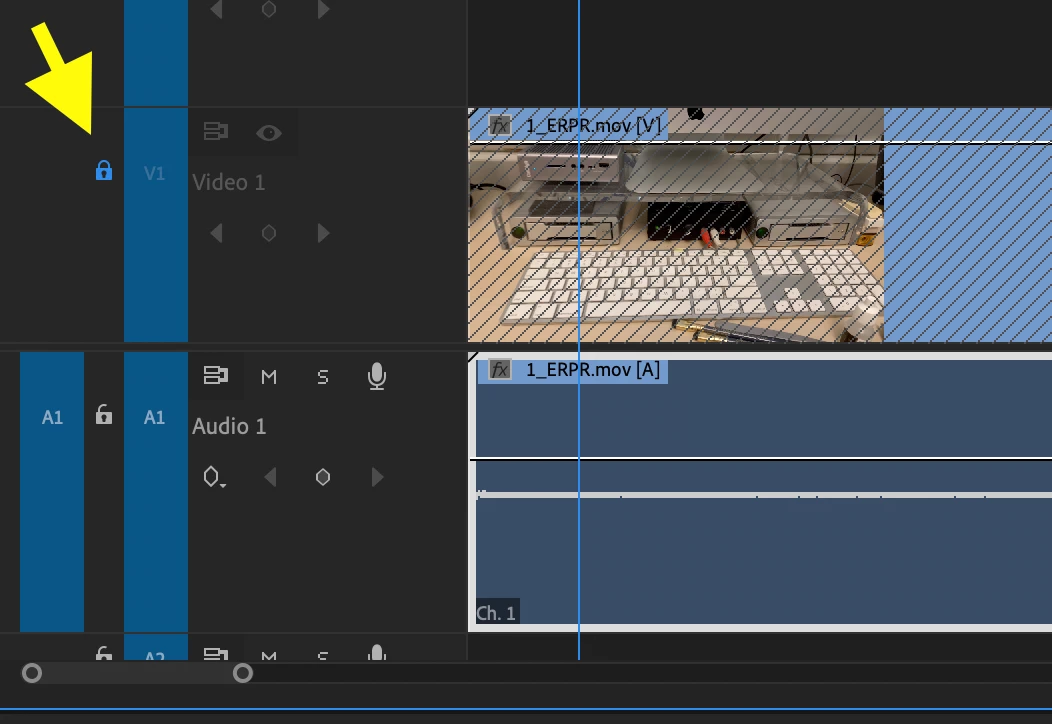
Lock the video track by mouse clicking on the Lock icon and the you can cut that audio as needed without cutting the video:


MtD

1 reply

Meg The DogCorrect answer
Inspiring
April 10, 2020

Lock the video track by mouse clicking on the Lock icon and the you can cut that audio as needed without cutting the video:


MtD

short73Author
Inspiring
April 10, 2020

Thank you, that worked.

I also noticed that I could do it by deselecting all the blue boxes on the side (eg. V1, V2 ) and only having the A3 box selected; is there any difference in these two approaches?
Thank you!


Inspiring
April 10, 2020

With the video track locked, you can't accidentally move the video track and throw everything out of sync.


MtD