Inspiring
February 11, 2021
Answered

How to remove the blue line inside Premiere Pro

  • February 11, 2021
  • 3 replies
  • 3614 views

Hello,

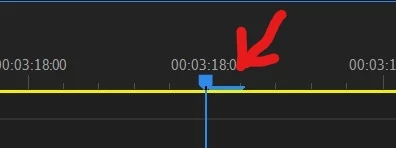
In the timeline I have a blue line at the right of the cursor.

What is it, and how to remove it ?
 

Correct answer Ann Bens

It is equivalent to 1 frame.

You cannot remove it, its part of the playhead.

3 replies

Participant
January 14, 2025

right mouse button on timeline>show audio time units

Participant
November 7, 2025

THANK YOU

R Neil Haugen
Legend
February 11, 2021

You only see that when you are zoomed WAY WAY in ... normally, 'one frame' distance on the timeline panel is less than the thickness of the vertical blue line across it. But when you zoom way in, they do provide this to indicate the 'width' of the frame on the timeline.


As it's handy to notice where the video frame boundary is when you are say moving/syncing audio files.


Neil

Everyone's mileage always varies ...
Ann Bens
Community Expert
Ann BensCommunity ExpertCorrect answer
Community Expert
February 11, 2021

It is equivalent to 1 frame.

You cannot remove it, its part of the playhead.
