Participant
Nov 16, 2026 2:31 AM UTC
Answered

How to remove the Effects panel visual previews ?

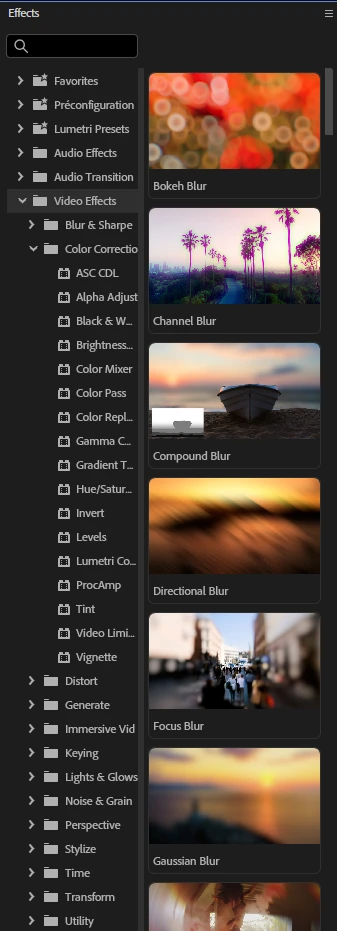
The Effects visual preview introduced in Premiere Pro 27.0 may be great for some people, but for other like me this is horrendous. My Effects panel has always been relatively thin but large enough for the text to be visible.
But now the previews eat half the width of the panel and can barely be shrunk. At the minimum they still occupy half of the width of the panel and I now need to scroll horizontally to read the effect name, this is getting ridiculous.

I don't care about previews, I know them by heart and I don’t want them. And I’m afraid this is forced to the user with no possibility to remove it and to have a clean, lean effect panel with just text.

Has anyone found a way to remove these previews ?


    CORCTON34033231
    CORCTON34033231Correct answer
    Community Expert
    Nov 16, 2026 3:01 AM UTC

    Hi, unfortunately there is currently no setting in Premiere Pro 27.0 to switch the visual previews off. They are part of the redesigned Effects panel in 27.0 — the What's new page says the panel "now has thumbnail images and preview videos for all the video effects and transitions", and the official help page on using effects describes the previews as part of the panel without offering a toggle to hide them.


    A few things that help in the meantime, all from that same help page:


    - Use the search box at the top of the Effects panel to jump straight to an effect by name, so you don't have to scroll the preview gallery.

    - Star the effects you use most as Favorites, or create custom bins for them — you can then work from those short lists instead of the full tree.

    - Browse the effects tree by category if you prefer, and drag the divider as you already found — though as you say, it only shrinks so far.


    If you haven't already, it's worth posting this as a Feature Request (an option to show the panel as a plain list) — this is exactly the kind of feedback Adobe asks for when a redesign removes a workflow. I know that's not the answer you were hoping for, but I didn't want to invent a hidden toggle that doesn't exist.


    Reference: https://helpx.adobe.com/premiere/desktop/add-video-effects/types-of-effects/about-effects-and-effects-panel.html

    8 replies

    JohnRael
    Known Participant
    Nov 18, 2026 9:18 AM UTC

    Good question! It’s super annoying.

    Translate
    Participant
    Nov 18, 2026 3:00 AM UTC

    Atleast Give a button to hide/show in side of Preview from source !

    Translate
    Participant
    Nov 17, 2026 2:53 PM UTC

    “Hi, unfortunately there is currently no setting in Premiere Pro 27.0 to switch the visual previews off.”

    Design flaw. Never introduce a feature without including a way to not use it.

    Translate
    Participating Frequently
    Nov 17, 2026 10:07 AM UTC

    Legit, this update has been the worst thing ive ever had to deal with in terms of upending my workflow. Cant scroll through blend modes, the effect images make the program feel like a cheep knock off for kids who are editing for the first time and they got rid of lumetri panel. I feel like they forgot that premier pro is for editing, not color management and they’re trying to make it friendlier with these images when in reality is just takes up even more space of the already restrictive UI. My effects panel used to take up just enough so I could read the words like a 10th of my monitor, now a fifth of my monitor is restricted to just effects because It has to include these images. But they wont change anything or listen to their community which is complaining over all of this. Instead they’ll keep ramming their heads against brick walls wondering why their stock price is falling off a cliff and their market share is swallowed up by other cheaper programs. 

    Translate
    Participant
    Nov 17, 2026 9:48 AM UTC

    So annoying its ugly and cramping out my flow!

    Translate
    CORCTON34033231
    Community Expert
    CORCTON34033231Community ExpertCorrect answer
    Community Expert
    Nov 16, 2026 3:01 AM UTC

    Hi, unfortunately there is currently no setting in Premiere Pro 27.0 to switch the visual previews off. They are part of the redesigned Effects panel in 27.0 — the What's new page says the panel "now has thumbnail images and preview videos for all the video effects and transitions", and the official help page on using effects describes the previews as part of the panel without offering a toggle to hide them.


    A few things that help in the meantime, all from that same help page:


    - Use the search box at the top of the Effects panel to jump straight to an effect by name, so you don't have to scroll the preview gallery.

    - Star the effects you use most as Favorites, or create custom bins for them — you can then work from those short lists instead of the full tree.

    - Browse the effects tree by category if you prefer, and drag the divider as you already found — though as you say, it only shrinks so far.


    If you haven't already, it's worth posting this as a Feature Request (an option to show the panel as a plain list) — this is exactly the kind of feedback Adobe asks for when a redesign removes a workflow. I know that's not the answer you were hoping for, but I didn't want to invent a hidden toggle that doesn't exist.


    Reference: https://helpx.adobe.com/premiere/desktop/add-video-effects/types-of-effects/about-effects-and-effects-panel.html

    Translate
    Participant
    Nov 16, 2026 3:17 AM UTC

    Thanks, I’ve posted a suggested feature.

    Translate
    Community Manager
    Nov 16, 2026 1:50 PM UTC

    Hi Association37827,
    Welcome to the community, and thanks for posting this feature request!
    This will help other users interested in the feature find it and upvote it. We’ll also discuss and advocate for it internally with our team to explore the possibility of implementation. I’m adding the feature request link here to make it easier for other users reading this post to find and upvote it.
    Thanks,
    Sumeet

    Translate