


zopfan
Known Participant
January 27, 2020
Answered

How to rename the parts of a split clip independently of each other?

  • January 27, 2020
  • 1 reply
  • 2527 views

When I cut a clip on TL (with Ctrl+k), then I try to rename both split clips separately, I can't. I rename one, the other is automatically names same/similar. How can I rename the splitted clips diff to each other on TL?


In other words, can I raname the cut parts of a clip independently of each other without creating them into sequences?
This topic has been closed for replies.
Correct answer Meg The Dog

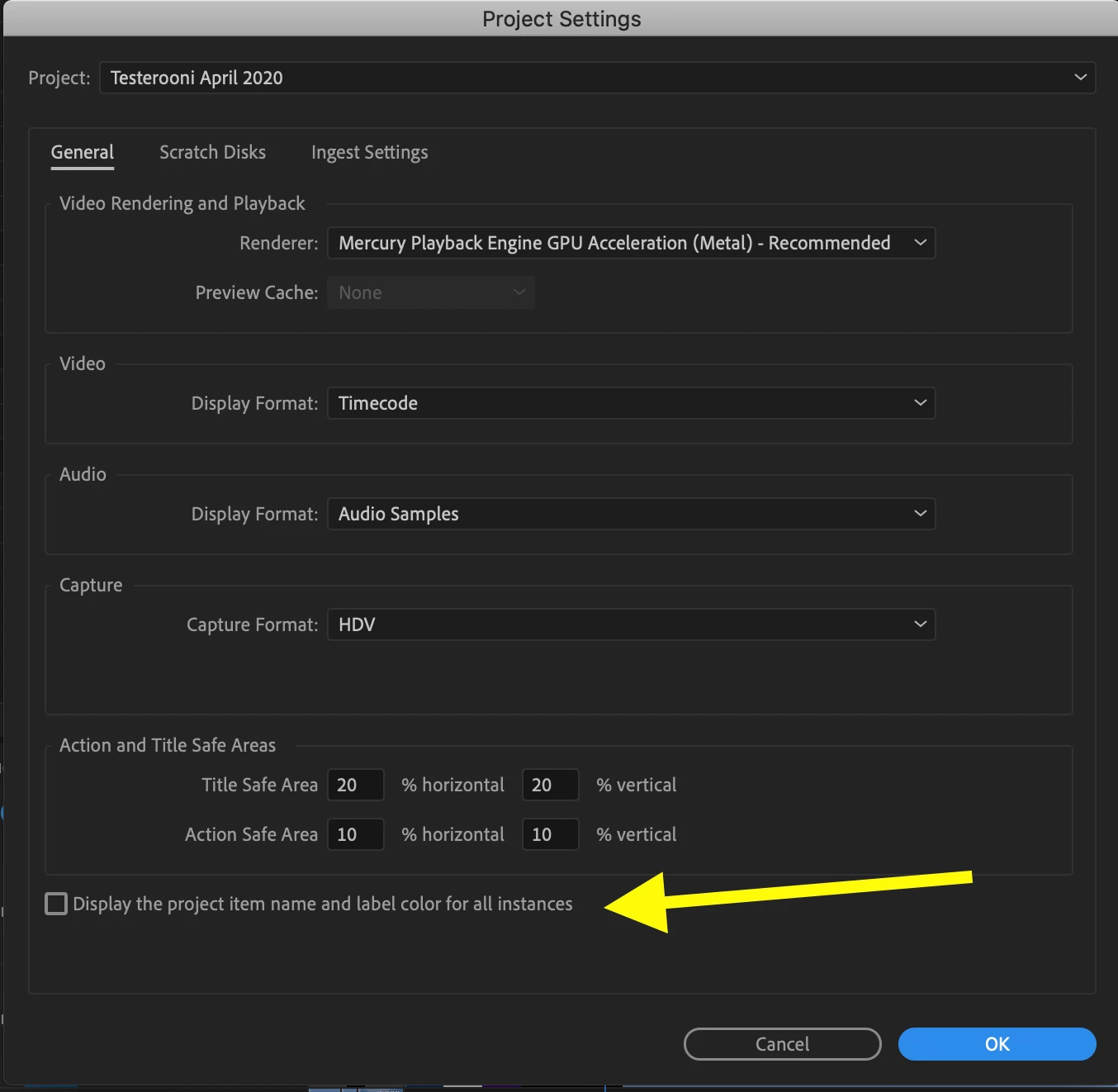
In the future, go to File > Project Settings > General and uncheck "Display the project item name and label color for all instances", before you begin changing the names. Caution - if you change this setting in an exisiting project in which you have alread made name changes, you may get undesired results. It may revert all clips on the timeline(s) to their orginal clip names.  If you plan to modify and existing project, make sure you have backups/protection copies of the project before you make this change.

MtD

1 reply

Meg The DogCorrect answer
Inspiring
January 27, 2020

In the future, go to File > Project Settings > General and uncheck "Display the project item name and label color for all instances", before you begin changing the names. Caution - if you change this setting in an exisiting project in which you have alread made name changes, you may get undesired results. It may revert all clips on the timeline(s) to their orginal clip names.  If you plan to modify and existing project, make sure you have backups/protection copies of the project before you make this change.

MtD

zopfan
zopfanAuthor
Known Participant
January 28, 2020

Thanks brother.

You won't believe, how I spent nearly 3 hours yesterday evening to sort this out.
Even I read, viewed tens of articles, videos thru Google, but all were explaining the renaming clips, or making sub-clips (even when I searched about naming clips). Not even one went into this direction as you caught my disease. Thanks very much. Perhaps I'll search the diff places now where I asked this and post this solution (or delete the query).


Thanks again.


P.S. This one thing also tells why I stronly advise myself (and others) not to change any default in any app till I'm familiar with the consequences of that option fully. But this one I couldn't resist the temptation and then, of course, forgot!!

Inspiring
August 27, 2023

However, in Premiere Pro 2023  23.6.0 Build 65, this has disappeared. Any suggestions?


Jay Gamel