
Answered
how to rotate a jpeg for sequence
Newbie here
how do i rotate a jpeg photo that im trying to put into sequence? Ive rotated it in computer files but still wont load correctly into premiere
Newbie here
how do i rotate a jpeg photo that im trying to put into sequence? Ive rotated it in computer files but still wont load correctly into premiere
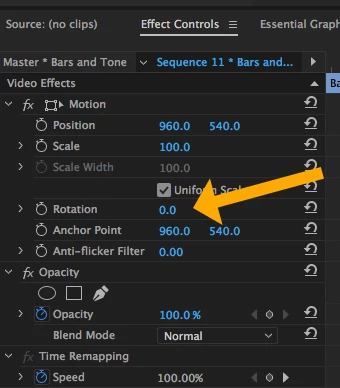
Place the jpeg on the timeline, Double click on it.
This will load it to the Effects Controls Panel.
Under Motion, adjust the control for rotation. If you rotate it and need to resize the image, adjust Scale.
MtD
Already have an account? Login
Enter your E-mail address. We'll send you an e-mail with instructions to reset your password.
 AdChoices