

rachelcenter
Legend
February 7, 2025
Answered

how to roundtrip from Premiere to Photoshop and back while maintaining color consistency

  • February 7, 2025
  • 1 reply
  • 955 views

I'm editing a video in premiere. My timeline color is REC709. I export a still frame from my timeline using the export frame button (the one that looks like a camera), bring it into photoshop and then use generative fill on the still frame in photoshop. I hit save (save as a PSD). Color space RBG. then bring it back into premiere and the color of the PSD doesnt match that of the clip on my timeline. Is that because Photoshop doesnt have a REC709 color profile to choose from? I dont want to change the color profile of my premiere timeline because its for television so it needs to stay at rec 709. Any advice for roundtripping from Premiere to Photoshop and back while maintaining color consistency?
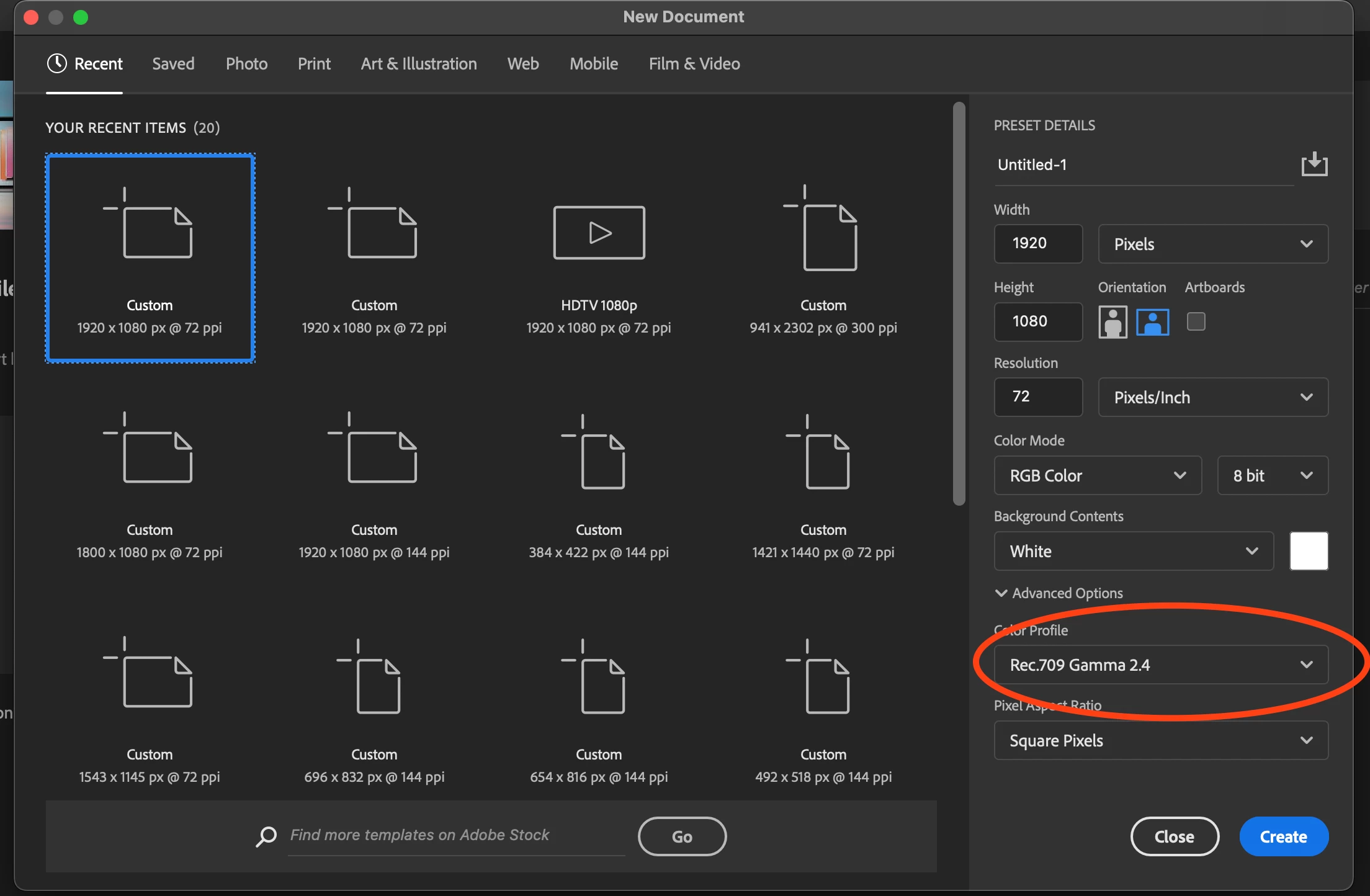
Correct answer rachelcenter

If I export the still image from premiere, then bring it back into premiere and leave photoshop out of this, the color is identical. So the issue has to be in photoshop somewhere, with the colorspace. trying to find where though.


Here is the solution: make sure you choose rec 709 gamma 2.4 in photoshop

1 reply

R Neil Haugen
Legend
February 7, 2025

You need to set the Photoshop CM for that item to Rec.709 in Photoshop. "Straight" sRGB isn't exactly the same.

Everyone's mileage always varies ...
rachelcenter
Legend
February 8, 2025

Pretty sure I tried that once and the colors still didnt match. Do you have a tutorial that I can follow?

R Neil Haugen
Legend
February 8, 2025

So get screen grabs of your Photoshop overall CM settings, and the dialog of CM for that item.


And your Premiere CM settings, basically the entire Settings tab of the Lumetri panel.

Everyone's mileage always varies ...