
How to save my effect presets so that they carry on through transitions
I am creating short videos that are effectively slideshows of pictures. I have created very basic effects so that the images will "zoom" in slightly (or scale up) and move towards one of the 4 corners. Very basic "animations". I use the default transition (cross dissolve) to move from image to image almost all the time. I have saved these effects as presets, set the to "scale", and yet they don't ever seem to put the key frames where I set them when I originally created the effect and saved it.
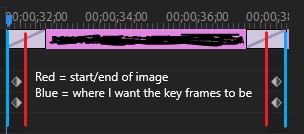
Everytime I apply one of my effects to an image, the key frames for the effect get set to 7 frames before the image starts on the timeline and 8 frames after the image ends on the timeline. What I want is for the effect to start at the beginning of the "in" transition and end at the end of the "out" transition. By default, Cross Dissolve seems to be set to last 1 full second, so 15 frames before the swap to 15 frames after.
So that brings me to my question: How can I save these effects as presets so that when I drag/drop the effect onto an image in the timeline, the keyframes will be automatically set to include the full "in" transition, the image itself, and the full "out" transition?


 AdChoices