
Inspiring
February 1, 2026
Answered

how to set the audio at -3db

  • February 1, 2026
  • 1 reply
  • 0 views

Hello,

I would like to set the audio of my video at -3db, ie : I would like that the audio could go up to -3 db (for the peaks), without exceeding -3 db.

What is the best Premiere Pro tool to use in order to do it ?
    Correct answer Averdahl

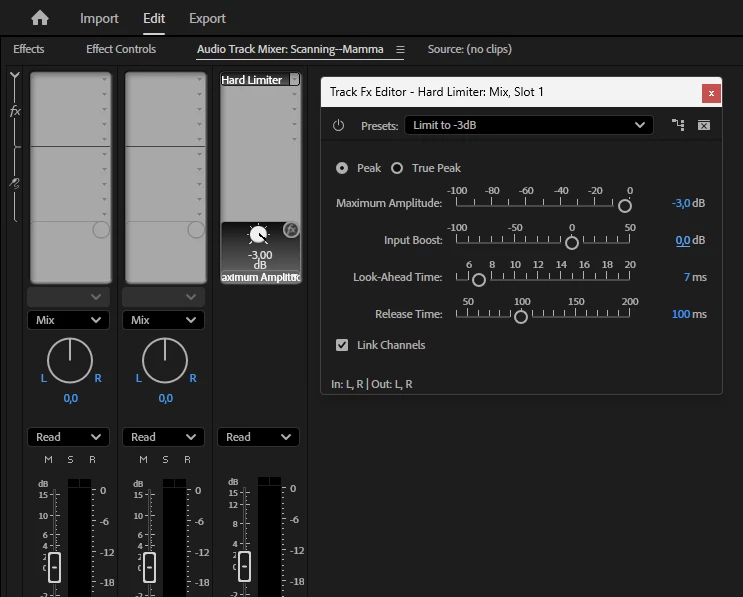
    I always use the Audio Mixer and apply the Hard Limiter to the Mix track and set the Maximum Amplitude to -3 and set the Input Boost to 0.


    Now the audio never exceeds -3 dB. :)


    1 reply

    Averdahl
    Community Expert
    AverdahlCommunity ExpertCorrect answer
    Community Expert
    February 1, 2026

    I always use the Audio Mixer and apply the Hard Limiter to the Mix track and set the Maximum Amplitude to -3 and set the Input Boost to 0.


    Now the audio never exceeds -3 dB. :)


    Inspiring
    February 1, 2026

    Why this choice of input boost at 0 db ?