

Cobra
Inspiring
June 27, 2022
Answered

How to sort the bin footage with creation date in ICON view

  • June 27, 2022
  • 3 replies
  • 2239 views

Why there is no sort button in the ICON view in the media browser and inside the BINS?

Drives me crazy, I want my files to be sorted by date.


The only workaround I found is putting the videos inside a BIN, turning list view ON and select the "Metadata Display" by left clicking over the bar. But this does not work with ICON or FREEFORM view! Isn't this super critical to be fixed?
 

This topic has been closed for replies.
Correct answer jerr.addison

I have found a method that sorts icons by creation date and any other parameter you choose too. 


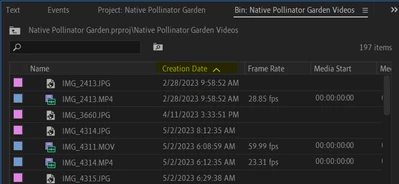
First, in list view, right click on the top edge where it says "Name... Frame Rate... Media Start..." 

2. Click "Metadata Display"

3. Type "Creation Date" and select it from the list and click "OK"

4. In list view, sort your media by Creation Date by clicking Creation Date at the top.

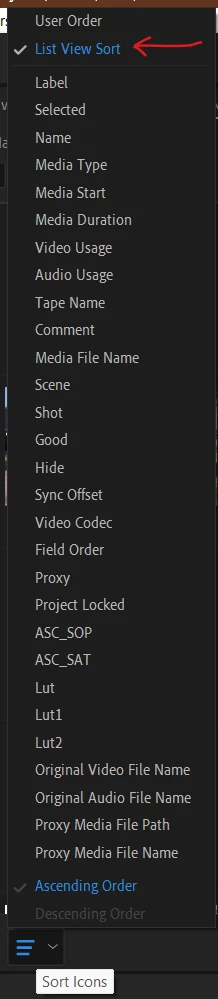
5. In Icon View, click the 3 lines that says "Sort Icons" 

6. Click "List View Sort"

7. Viola! Your icons are sorted by Creation Date!


3 replies

jerr.addisonCorrect answer
Participant
September 13, 2024

I have found a method that sorts icons by creation date and any other parameter you choose too. 


First, in list view, right click on the top edge where it says "Name... Frame Rate... Media Start..." 

2. Click "Metadata Display"

3. Type "Creation Date" and select it from the list and click "OK"

4. In list view, sort your media by Creation Date by clicking Creation Date at the top.

5. In Icon View, click the 3 lines that says "Sort Icons" 

6. Click "List View Sort"

7. Viola! Your icons are sorted by Creation Date!


Participating Frequently
May 15, 2024

There's an imperfect workaround to the icon sort issue.  Add your choice of metadata feature for sorting.  Go into list view then sort by metadata (creation date etc), return to icon view, then select "list view sort" from triangle shaped haamburget menu at the bottom of the bin window.  The icons will re-sort into your metada-defined order (creation date, etc).  Trouble is, you have to reset this every time you change layout or quit premiere.  Not ideal and a huge time waster, but it works.

Joost van der Hoeven
Community Expert
Community Expert
June 27, 2022

Correct, you can't sort on Creation Date in the Icon-View. This is user to user forum where we users help each other. The Adobe engeneers do not always read everything here. If you feel strongly about a (new)feature or (bug) fix please post it on uservoice, as it will be read by the engeneers.
https://adobe-video.uservoice.com/forums/911233-premiere-pro

Cobra
CobraAuthor
Inspiring
June 27, 2022

I found it on voice. Some else has requested it back in 2018

https://adobe-video.uservoice.com/forums/911233-premiere-pro/suggestions/35422729-sort-icon-view-by-creation-date


I guess most creators dont care to vote for that. Well if someone wants, here is the link