


Participant
March 24, 2022
Question

How to Synchronize Multiple Video and Audio Tracks in Adobe Premier Pro?

  • March 24, 2022
  • 3 replies
  • 573 views

Hi Everyone,


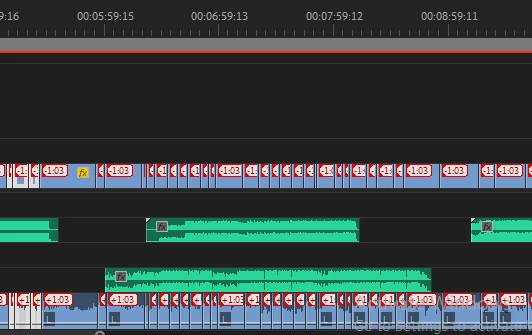
Somehow I have desync all of my audio and video track and this is really annoying. Have been searching for a solution through the internet but could find it. 

Can anyone please share a quick solution for this.


This topic has been closed for replies.

3 replies

Community Expert
March 24, 2022

Just adding another option on top of Ann's answer. Turn off Linked Selection for the Timeline, select all the audio or video and move it 1:03 until it's back into sync. If you have a numpad you could select all the video on V1 and just type +103 into the numpad and that should nudge it all down the correct amount. (Or the same thing but -103 if you select all the audio.)

Community Expert
March 24, 2022

Select all the moved audio by Alt lassoing the clips, then Alt left or right arrow keys to nudge the audio a frame at a time

Ann Bens
Community Expert
Community Expert
March 24, 2022

Toggel sync lock of for the audio and ripple delete.