


Participant
Mar 3, 2017 10:33 PM UTC
Answered

How to turn off scrolling to adjust effects?

Hi there! I'm using Premiere Pro on my Macbook Pro, and one error I often make by mistake is using my touch pad to scroll over an effect window, accidentally editing the effect.

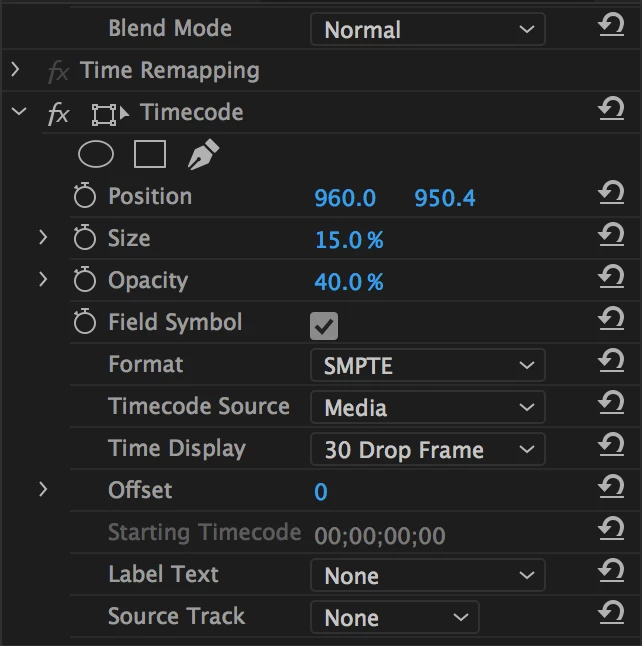
For example, I might be scrolling down to see more effects, but because my cursor is placed in the middle of the effects box, I'll change the Format away from SMPTE to something different.

Is there a way to turn off this function so that I can scroll without worrying about accidentally messing something up?

Thank you,

Zach
Mystical_fact5EEACorrect answer
Participant
Aug 7, 2023 4:52 AM UTC

There seems to be no answer here, aside from [Buy a mouse]...  Which is a great idea for laptop users, people that prefer trackpads, or those who are traveling.
Perhaps Adobe should fix their software so while scrolling down the narrow menus, if a mouse accidently goes over a selection area, the software thinks you want to scroll through 10 options, vs scroll down the menu... This results in needing to do 10x Command-z to fix the problem, but it's hard to guess that the setting was before it accidently changed 10x within .2 seconds...

19 replies

LEVEL10
Participant
Sep 5, 2025 2:23 AM UTC

It's 2025, and this feature is still needed.

Translate
Participant
Aug 19, 2024 1:49 AM UTC

It's 2024, and this is still not a thing? HOW?

Translate
Mystical_fact5EEACorrect answer
Participant
Aug 7, 2023 4:52 AM UTC

There seems to be no answer here, aside from [Buy a mouse]...  Which is a great idea for laptop users, people that prefer trackpads, or those who are traveling.
Perhaps Adobe should fix their software so while scrolling down the narrow menus, if a mouse accidently goes over a selection area, the software thinks you want to scroll through 10 options, vs scroll down the menu... This results in needing to do 10x Command-z to fix the problem, but it's hard to guess that the setting was before it accidently changed 10x within .2 seconds...

Translate
Participant
Nov 24, 2023 6:36 PM UTC

yeah, this is a software issue not a hardware issue. it'd be easy enough to make this an option to allow "scrolling" through select lists

Translate
Participant
Mar 31, 2024 9:23 PM UTC

One hundred percent agree with both of you. I came to this forum expecting to find people advising on how to find a setting to turn this off. Never expected in a million years that the industry standard just wouldn't have a setting to make this software more accessible and palatable to people who don't have workspaces that allow for mice. 

Translate
Participant
Mar 12, 2017 1:05 AM UTC

Thanks for the workarounds. Scrolling is great, but I just would just like to turn off the option to "scroll to adjust effects." I don't think that would be too hard to add as a preferences option. I'm traveling often and don't usually use a desk, or else I might buy a mouse.

For now, I'll just resort to being careful, and occasionally navigating to the History to undo my mistakes.

Translate
shooternz
Legend
Mar 12, 2017 5:45 AM UTC
. A scrolling mouse has always been my solution.

Mine too.  Why wouldnt ya?

Translate
RTHiggins
Inspiring
Mar 4, 2017 7:41 PM UTC

Well hey it was just a thought. Yeah touchpads probably aren't the best choice when it comes to scrolling. Manually grab that wild one(scroll bar) and bring her down and up. I have to do it all the time with my wacom intuos pro.

-T

Translate
R Neil Haugen
Legend
Mar 4, 2017 5:57 PM UTC

For me, touch pads have been inherently flawed like this example in most programs ... I just can't seem to get a setting that can differentiate consistently whether I'm scrolling or pushing harder to select something. A scrolling mouse has always been my solution.

Neil

Translate
Everyone's mileage always varies ...
RTHiggins
Inspiring
Mar 4, 2017 6:44 AM UTC

Or tab through it using your keyboard like a keyboard champion. Shift+7 that pony and tab it up using spacebar and arrowkeys to nav through your edits or just stop scrolling so much. Jeez

Translate
Inspiring
Mar 4, 2017 5:14 PM UTC

If I am working in the Effect Controls Panel and some of the parameters are hidden below what the pane is currently showing (as in this example):

Typing the Tab key will step through the individual parameter settings but will not cause the display to scroll up; typing the space bar will start playback of the timeline. What the OP is looking for is a way to scroll up the display within the Effect Controls Panel.

MtD

Translate
Inspiring
Mar 3, 2017 11:42 PM UTC

This won't be much help,  but the only way I know is to make sure your cursor is in a safe area (within the boxed areas below) before scrolling:

MtD

Translate