
benjamint91291284
Known Participant
April 4, 2017
Answered

How was this wave effect done?

  • April 4, 2017
  • 1 reply
  • 3253 views

Lil Pump - Flex Like Ouu (Shot by @_ColeBennett_) - YouTube

The effect i'm referring too is at the very beginning of the video where it looks wavy on the artists face and is seen throughout the rest of the video. My assumption was that it was done with the Wave Warp effect but I have not been able to replicate it... Also I am aware this may have been done with after effects but I wasnt sure which forum to ask this question in...

Thank you!
    This topic has been closed for replies.
    Correct answer Meg The Dog

    This effect can be replicated by using the Video Effects > Distort . Wave Warp effect, but it requires a source clip that is larger in pixel dimensions than the sequence - for example 4K footage edited on an HD timeline.

    The effect is applied and the image is scaled to fit the sequence so to avoid seeing the (black) edges of the waves.

    If you don't have oversized source material to work with, you can apply the effect to the clip and then scale the clip larger slightly to hide the edges. This will soften the image somewhat, but it may be acceptable to you.

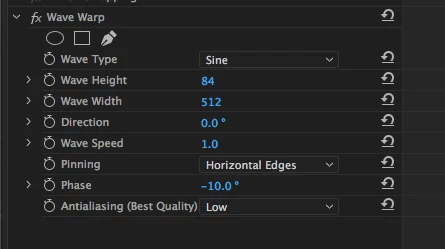
    Some Wave Warp settings to start with and then adjust to your taste:

    MtD

    1 reply

    Meg The DogCorrect answer
    Inspiring
    April 4, 2017

    This effect can be replicated by using the Video Effects > Distort . Wave Warp effect, but it requires a source clip that is larger in pixel dimensions than the sequence - for example 4K footage edited on an HD timeline.

    The effect is applied and the image is scaled to fit the sequence so to avoid seeing the (black) edges of the waves.

    If you don't have oversized source material to work with, you can apply the effect to the clip and then scale the clip larger slightly to hide the edges. This will soften the image somewhat, but it may be acceptable to you.

    Some Wave Warp settings to start with and then adjust to your taste:

    MtD