Participant
June 11, 2023
Question

HUD glitching

  • June 11, 2023
  • 2 replies
  • 266 views

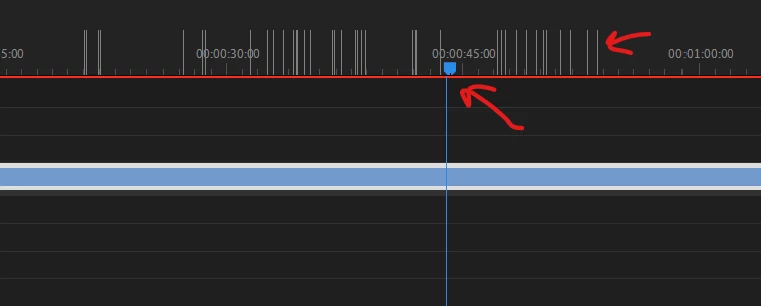
Hi, I recently had to wipe my computer and fresh instal windows. I reinstalled Premiere Pro (never had this problem before) and my interface is glitchy (see the screenshot), like the timeline cursor is not at the right place, and when a mouse over the timeline it creates a lot of marks. Also, my wheel (using alt + wheel) works one on ten times, and works perfctly fine outside of Premiere pro. If anyone have ideas, I take it !
 

This topic has been closed for replies.

2 replies

Participant
June 12, 2023

Hello,


I tried both things. I had indeed a game ready driver from Nvidia, and tried to instal a studio one instead, but it didn't change anything for Premiere Pro. 


So basically, i still have the problem :x

Kevin-Monahan
Community Manager
Community Manager
June 11, 2023

Hi @Jérôme29767330rtd7,

Happy Sunday! I read your report. I have seen such issues before. You might try resetting the workspace. If that doesn't help, check your GPU drivers and see that you have the latest studio driver installed. Let us know if either of these things help. Sorry for the trouble.


Thanks,
Kevin

Kevin Monahan - Sr. Community & Engagement Strategist – Pro Video and Audio