edit58989569
Inspiring
December 24, 2023
Question

I can never see Captions Tracks on the timeline

  • December 24, 2023
  • 7 replies
  • 620 views


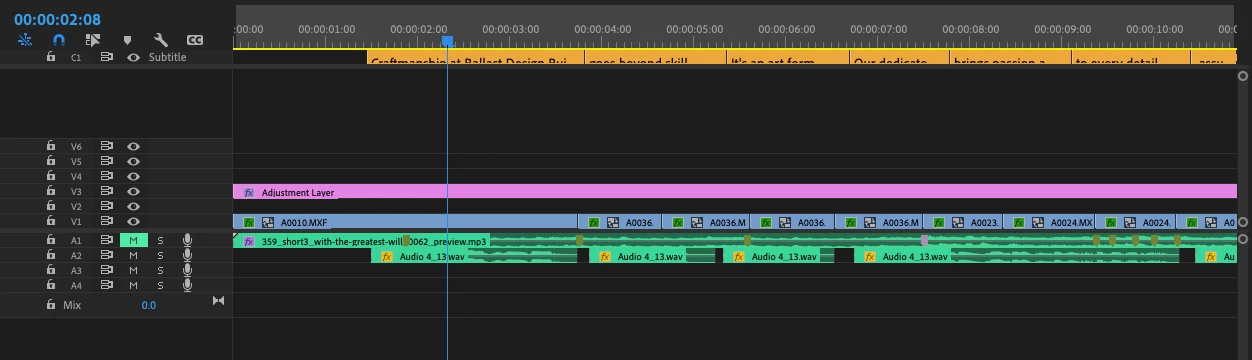
Adobe - Could you fix the captions timeline track? This happens on every project. I can never see it. Yes, I have closed and reopened everything. I'm 24.1.0. This is getting old.

This topic has been closed for replies.

7 replies

Stan Jones
Community Expert
Community Expert
January 10, 2024

@edit58989569,


Sorry to hear that didn't work.


Hide then show did not reveal the full caption track height? That is working for me.


But I still don't understand why this would happen with every project. Or how it gets into the "shows only part" state. Can you provide more information?


Stan


edit58989569
Inspiring
January 10, 2024

it didn't reset the track height so you can see the text. 

MarekMularczyk
Community Expert
Community Expert
January 7, 2024

Did it work?


Adobe Community ExpertAdobe Certified Professional
edit58989569
Inspiring
January 3, 2024

@MarekMularczyk Yes, let me rephrase. I can see the caption track, but the view of the text is cropped. I will try Stan's fix below. 

MarekMularczyk
Community Expert
Community Expert
December 25, 2023

You do have a Captions track, it's right on the top of your Timeline in your screenshot.


Adobe Community ExpertAdobe Certified Professional
Stan Jones
Community Expert
Community Expert
December 24, 2023

Actually, the easiest adjustment for a single caption track is CC in the track header area and "show active track." Even if there is only one or if there are multiples and only one is showing, it resets what is showing to the maximum up to 25% of the timeline panel. At least one track must be enabled/active.


You can assign a shortcut.


Stan


Stan Jones
Community Expert
Community Expert
December 24, 2023

I don't know why it would be created like that every time.


See this post:

https://community.adobe.com/t5/premiere-pro-ideas/make-caption-track-height-adjustable/idc-p/13492532#M323


I can't check it at the moment, but I think click on the CC icon and Hide all caption tracks, then Show all caption tracks should fix it.


Stan