Participant
January 19, 2021
Question

I can't cut where I want in Premiere Pro 14.8
  • January 19, 2021
  • 3 replies
  • 2117 views

I can't cut where I want
But music files are possible
Only the video file is cut in a strange location

3 replies

R Neil Haugen
Legend
January 22, 2021

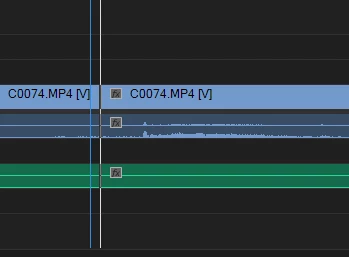
We can't see enough of your timeline to give a specific answer. But typically when this comes up, it's because someone wants to cut on a specific sound in a very zoomed-in timeline, and as PeruBob notes, is actually trying to cut within a frame.


You can zoom in enough that a frame covers a bit of the panel. Easily told by looking at the top of the CTI ... current time indicator, or "playhead". If it has a tail off to the right, that tail is exending to the end of the current clip.


Say if you have 24 frames per second, and you're way zoomed in, and want to cut at a precise point in the sound. The audio is a "continuous" media, the video is 24 still images per second. You can't cut a video frame in parts, it must be complete. So you can only cut the video on a frame. But the audio can be cut anywhere, as it's a continuous medium.


It's a bit of a pain as you get used to it, but really ... it's something everyone deals with, and you never notice the very slight difference in image/sound in everybody else's work do you?


Neil

Everyone's mileage always varies ...
Peru Bob
Community Expert
Community Expert
January 21, 2021

Are you trying to cut in the middle of a video frame?

Kevin J. Monahan Jr.
Legend
January 21, 2021

Hi Soohyu,
Sorry for the issue. Can't you move forward a frame or two to make a splice? Is that what you wish to do? 

Let me know.

Thanks,
Kevin

Kevin Monahan - Sr. Community and Engagement Strategist – Adobe Pro Video and Audio