
Participant
June 9, 2020
Answered

I Can't drag purchased mogrt. files into timeline even it's compatible with my software version

  • June 9, 2020
  • 3 replies
  • 8588 views

Hi Guys!

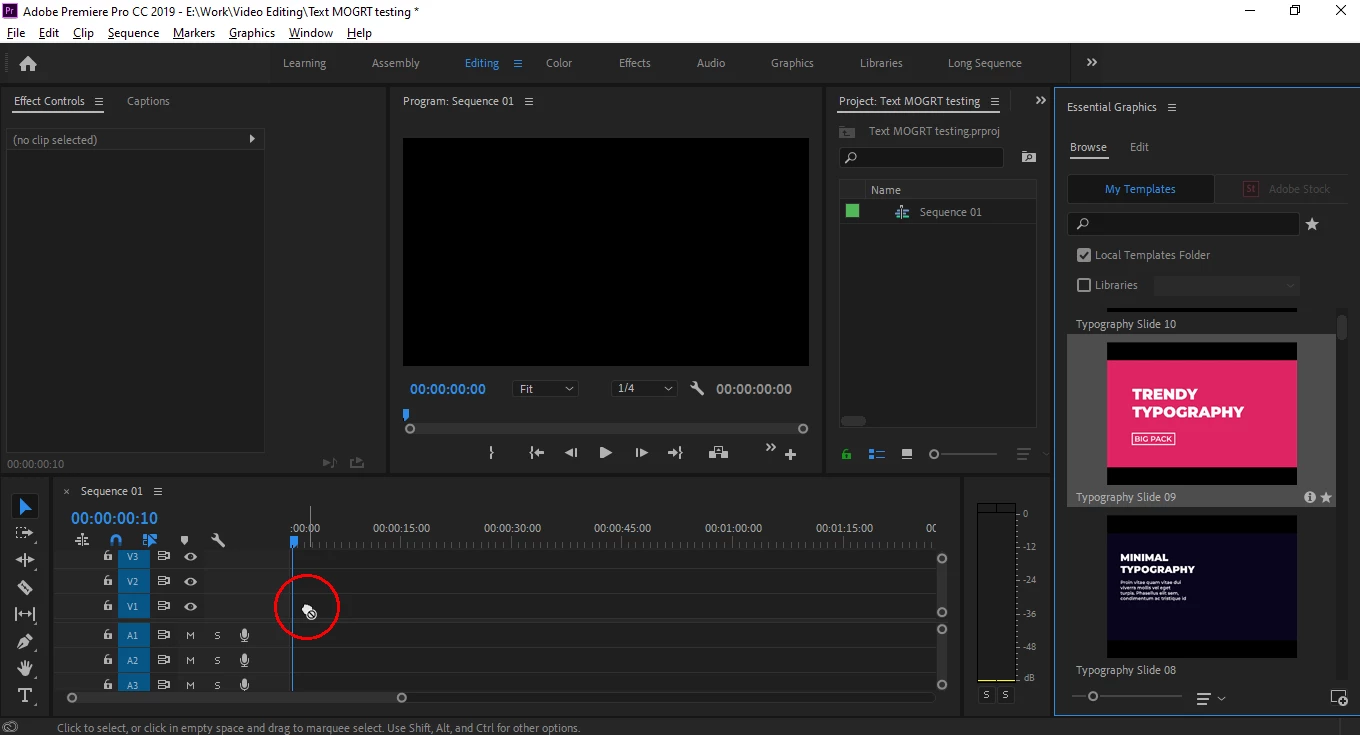
Now I installed MOGRT. Files but I can't even drag them into the timeline (Check the screenshot down below) but whenever I use the built-in MOGRT. files, it works pretty well. However, I made sure it's compatible with my Premiere Pro version. I use Premiere Pro CC 2019... Would you please help me. thanks in advance.


Abdelrahman 


#mogrt

Correct answer MyerPj

Drag a clip there first. You don't / can't drag a mogurt first. (btw: you can right-click in the project and create a black video or color bars for a test clip)


EDIT: 2023-06-14: We're now on version 23.4 - This doesn't apply anymore, you CAN drag a mogrt to an empty sequence. You can't drag a mogrt to an empty timeline panel hoping to create a sequence as you can with a clip.

3 replies

Participant
July 11, 2023

Thank you for this - thought I was going crazy 

Ann Bens
Community Expert
Community Expert
June 9, 2020

Please post link to the vendor.

MyerPj
Community Expert
MyerPjCommunity ExpertCorrect answer
Community Expert
June 9, 2020

Drag a clip there first. You don't / can't drag a mogurt first. (btw: you can right-click in the project and create a black video or color bars for a test clip)


EDIT: 2023-06-14: We're now on version 23.4 - This doesn't apply anymore, you CAN drag a mogrt to an empty sequence. You can't drag a mogrt to an empty timeline panel hoping to create a sequence as you can with a clip.

Ruth@Medusa
Participant
April 15, 2021

thank you!!! such a simple answer -I had a 24 hour head wreck!! problem solved!


Participant
January 27, 2022

I'm so glad I found this thread before heading down my own 24 hour head wreck ha ha. Thanks all!