Participating Frequently
October 4, 2026
Answered

I can't use the button "keyboard shortcuts" in premiere pro 2026 on a Mac.

  • October 4, 2026
  • 14 replies
  • 69 views

I can't use the button "keyboard shortcuts" in premiere pro 2026 on a Mac.

Also the shortcut keys, option command k, didn’t work. 

 

    Correct answer Averdahl

    @samg1236722 O.k, then i would have uninstalled and then reinstalled Premiere.

    Or, close Premiere and go to Users/Username/Documents/Adobe/Premiere Pro/26.0/Profile-Username and delete everything but the folder named Mac. You want to keep the folder named Mac because this is where you have your .kys-files, iow the custom keyboard shortcuts you have made earlier.

    Next time you launch Premiere the rest will be re-created and hopefully that will do the trick. If not, a uninstall plus a reinstall is the only option.
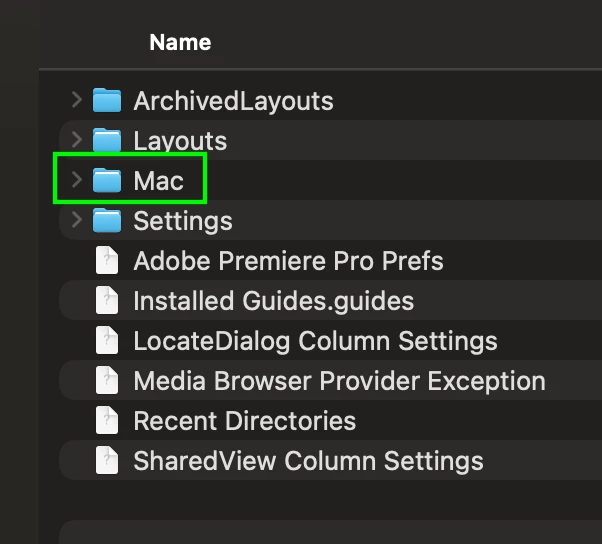
     

    Keep only the Mac folder


    14 replies

    Participating Frequently
    October 4, 2026

    Problem solved, thanks everyone for the help! 

    Warren Heaton
    Community Expert
    Community Expert
    October 4, 2026

    ​@samg1236722:

    Are you running a keyboard remapper or windows manager?  An accessibility or input utility?  Those can interfere with application keyboard shortcuts.  If you’re not sure if you are, a quick test would be to boot your Mac in Safe Mode and try Command Comma and Command Shift K in Premiere.

    Ann Bens
    Community Expert
    Community Expert
    October 4, 2026

    If you still have 2025 installed try copy the kys file over to 2026 (this is not your custom file but the native files.)

    Located in Program files > Adobe………..

    If that does not work: re-install and use cleanertool.

    Averdahl
    Community Expert
    Community Expert
    October 4, 2026

    Try to launch Premiere while you are holding down the Shift-key to get the Reset options dialog. Check Reset app preferences and click on Continue.


    Participating Frequently
    October 4, 2026

    Yes already tried that one too.. no improvements unfortunately.

    Averdahl
    Community Expert
    Community Expert
    October 4, 2026

    Have created and saved any shortcuts you have made or are you using the default in Premiere?

    If you go to Premiere > Keyboard Shortcuts, is the Preset set to Adobe Premiere Pro Default?

    CORCTON34033231
    Community Expert
    Community Expert
    October 4, 2026

    Hi — a heads-up that the only reply below is spam and doesn't answer your question.


    Since both the menu command (Premiere Pro > Keyboard Shortcuts) and the standard Option+Command+K shortcut do nothing in 2026, that points to a problem with the app itself rather than something you can fix in settings. The best next step is to report it via the Bug Reports tab so the team can reproduce it.