Inspiring
August 5, 2025
Answered

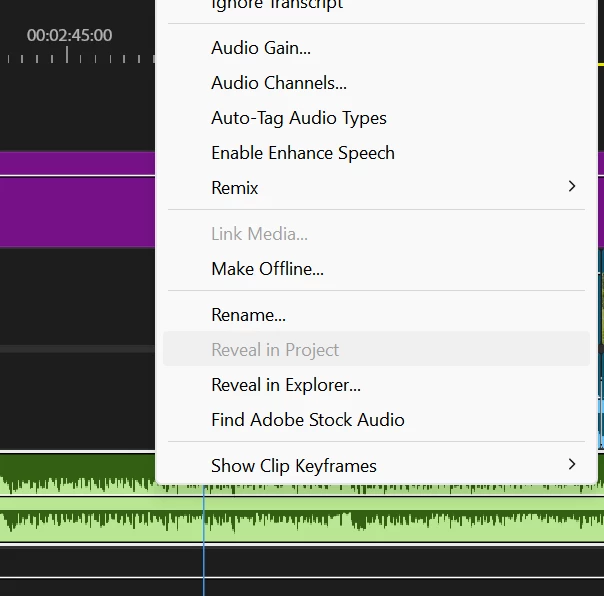
I can't view the file in the project

  • August 5, 2025
  • 4 replies
  • 236 views

I can't view the file in the project


Correct answer Sumeet_Kumar_Choubey

Having multiple clips selected may cause the option to be greyed out. When using Reveal in Project option, make sure only the required clip is selected and no other clips are highlighted. Hope it helps.

 
Thanks,
Sumeet

4 replies

Adobe Employee
August 5, 2025

Hi Paul,

Please elaborate the issue you are experiencing in Premiere Pro. Are you not able to use the Reveal in Project option? Let us know, we're here to help.


Thanks,

Sumeet

Inspiring
August 10, 2025

yes

Intel Core i7-14700K 3.4GHz/33MB s1700 BOX MSI MAG Z790 Tomahawk Max Kingston Fury DDR5-6400 65536MB PC5-51200 be quiet! MSI PCI-Ex GeForce RTX 5070 Ti Gaming Trio OC 16GB GDDR7 SSD Samsung 990 Pro 2TB M.2 PCIe 4.0 x4 NVMe 2.0 V-NAND 3bit MLC SSD Samsung 990 Pro 1TB M.2 PCIe 4.0 x4 NVMe 2.0 V-NAND 3bit MLC Toshiba MG Series Enterprise 20TB 7200rpm 512MB MG10ACA20TE 3.5 SATA III Windows 11 Pro 25H2
Sumeet_Kumar_ChoubeyCorrect answer
Adobe Employee
August 26, 2025

Having multiple clips selected may cause the option to be greyed out. When using Reveal in Project option, make sure only the required clip is selected and no other clips are highlighted. Hope it helps.

 
Thanks,
Sumeet

Ann Bens
Community Expert
Community Expert
August 5, 2025