Participant
January 19, 2025
Answered

I cant copy and paste to different timeline channels

  • January 19, 2025
  • 3 replies
  • 339 views

Hello, I have a strange problem. Everytime I try to copy and paste something, Audio/video to an specific channel in my timeline I cant!! I always paste it to the channel 1, I know I have to select the desired channel to paste my items to that channel. But It always paste it to channel One, So I have to lock the channel 1 to paste it to channel 2, but its so annoying, because in past it worked fine!! Please any solutions?? 

Correct answer MyerPj

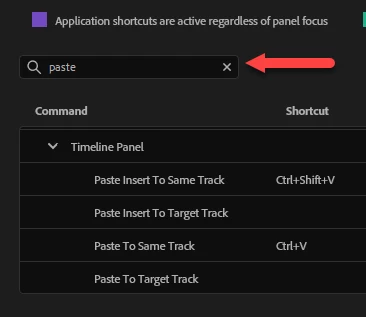
Check out the Paste options in the Keyboard shortcut screen


3 replies

Participant
January 21, 2025

awesome! thank you guys! You helped me a lot! This makes the differente!! Keep the good vibe!

MyerPj
Community Expert
MyerPjCommunity ExpertCorrect answer
Community Expert
January 20, 2025

Check out the Paste options in the Keyboard shortcut screen


Stan Jones
Community Expert
Community Expert
January 20, 2025

@Adrian31562651sntm,


This post was in the Beta forum, but I think it explains the "paste to same track" issue:

https://community.adobe.com/t5/premiere-pro-beta-discussions/paste-a-clip-always-in-video-1-instead-of-target-track/m-p/14123521#M8089


You can change the shortcut keys.


Stan