


Participant
April 18, 2025
Answered

I cant use GPU

  • April 18, 2025
  • 4 replies
  • 1272 views

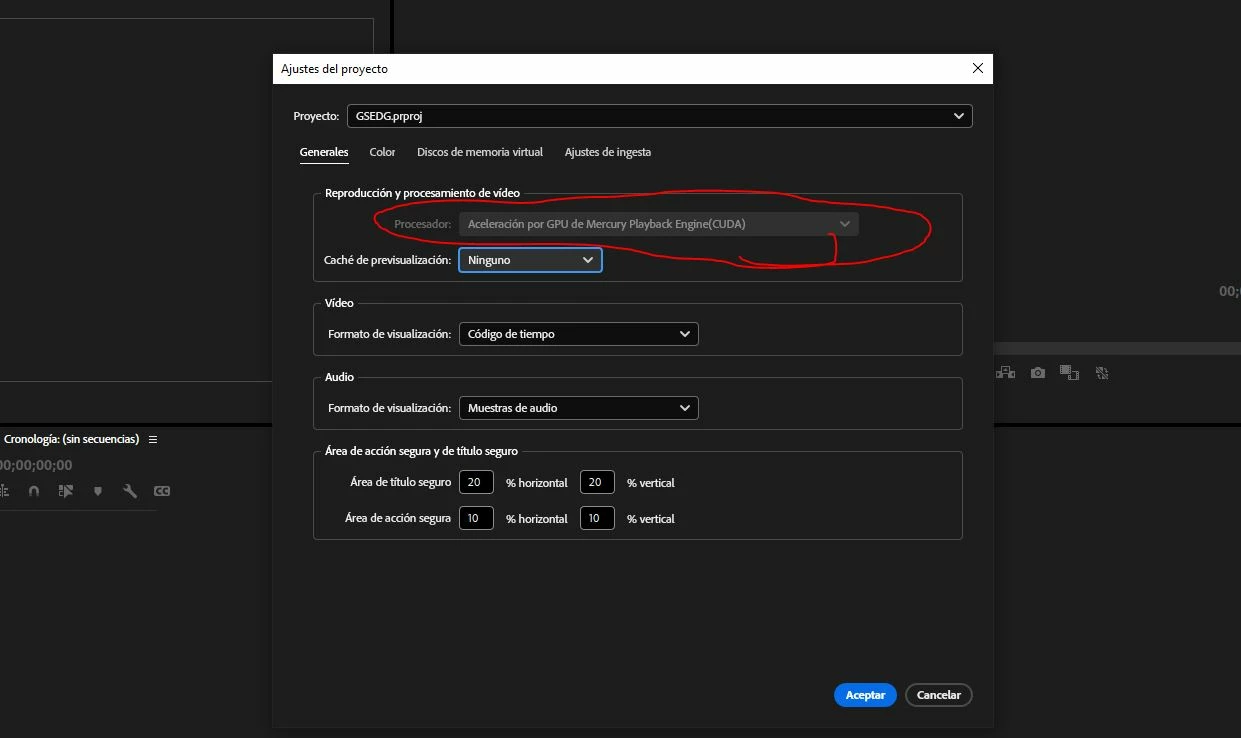
Hello, im trying to enable the GPU use in my premiere pro, but I cant, its all gray, I dont know why this hapenned, but My CPU goes crazy now, I need to turn on my GPU, I have a Nvidia GTX 3060 Ti.
I already uninstalled premiere and installed again, I have the lastest drivers, I created new projects and still Cant enable the GPU use, please helpmeeeee
plx hhelp

Correct answer Fergus H

@Adrian31562651sntm I'm sorry for the confusing dialog box! The short story is that what you are seeing is correct and your GPU is being used. You don't need to do anything. 


The longer story is that this menu is greyed out because there are no choices available for you to make: you have a single GPU type in your computer and that GPU is being used. If you had two different types of GPU, then the menu would be active. Also, in previous versions of Premiere Pro, you could also choose to render using software instead of the GPU. That option was removed in v25.2. 


We are thinking about how to make this clearer but again, there's nothing you need to do. Your GPU is being used. 


Regards,

Fergus

4 replies

Fergus H
Community Manager
Fergus HCommunity ManagerCorrect answer
Community Manager
April 22, 2025

@Adrian31562651sntm I'm sorry for the confusing dialog box! The short story is that what you are seeing is correct and your GPU is being used. You don't need to do anything. 


The longer story is that this menu is greyed out because there are no choices available for you to make: you have a single GPU type in your computer and that GPU is being used. If you had two different types of GPU, then the menu would be active. Also, in previous versions of Premiere Pro, you could also choose to render using software instead of the GPU. That option was removed in v25.2. 


We are thinking about how to make this clearer but again, there's nothing you need to do. Your GPU is being used. 


Regards,

Fergus

MyerPj
Community Expert
Community Expert
April 22, 2025

Hey @Fergus H , just enabling that drop-down with only the one option would be I think pretty simple and clear that's the one available choice.

Participant
April 22, 2025

Hello guys, so at the end I did not understand at all, you are telling me that I cant enable  the GPU Engine (CUDA) Anymore????????????? o___O, PLXX help!

JonesVid
Community Expert
Community Expert
April 19, 2025

[Edited by moderator]

Ann Bens
Community Expert
Community Expert
April 19, 2025

[Edited by moderator]

JonesVid
Community Expert
Community Expert
April 19, 2025

[Edited by moderator]

Ann Bens
Community Expert
Community Expert
April 18, 2025

Your card is enabled. There is no more Software only option in 25.2.


Unable to find the article about this.

Fergus H
Community Manager
Community Manager
April 19, 2025

@Ann Bens You raise a good point about the article. Currently there isn't one, so I drafted one that we'll publish soon. 


Also, while we've used the same UI on Mac ever since Premiere Pro was available on Apple silicon, we're open to ideas about how to make this more obvious. On a computer with a single GPU type, the renderer menu is greyed out; is there a better way to display that there's no choice (other than removing this section of the dialog entirely)? 


Thanks,

Fergus

Ann Bens
Community Expert
Community Expert
April 19, 2025

Maybe add a sentence in case of single GPU type.: detected graphics card is supported.