
harmonayyyys48222454
Participant
September 24, 2017
Answered

I don't even know what has happened?? PLEASE HELP IMMEDIATELY!!

  • September 24, 2017
  • 4 replies
  • 2514 views

So basically what happened was, I was rendering clips then I added a few more and i must've clicked something becaus then it wouldn't let me render or even export absolutely anything just for this one project which is really important t me. (I don't have a backup either ) PLEASE HELP!

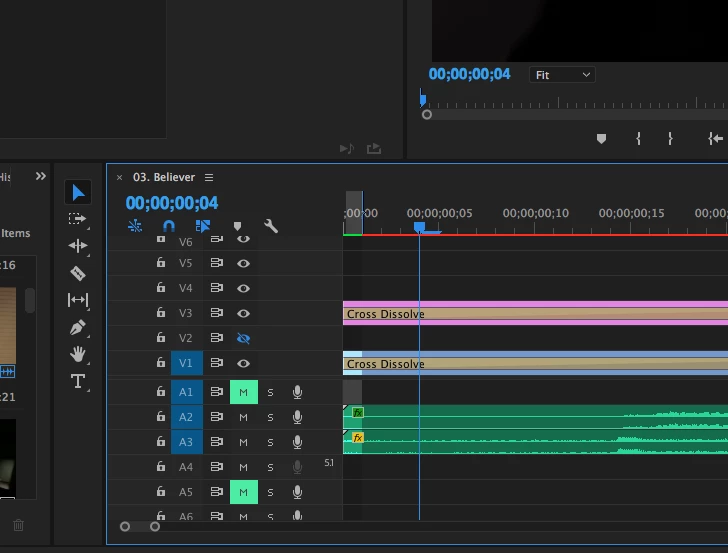
I zoomed in and it looked like this and basically when it renders it just plays this and when I export it, it only exports this part?? how do i unselect it? it won't just let me click away??
This topic has been closed for replies.
Correct answer excited_Genie16B8

Clear your Out point, or change the export from Sequence In/Out to Entire Sequence.

4 replies

Participant
September 27, 2023

Right Click, and press ''Clear In and Out"

excited_Genie16B8Correct answer
Legend
September 24, 2017

Clear your Out point, or change the export from Sequence In/Out to Entire Sequence.

Warren Heaton
Community Expert
Community Expert
September 24, 2017

You've marked your Out at frame 0;00;00;00 (the first frame of your timeline) and then your export is set to the default In to Out range.  Hence, you've told Premiere Pro to only export one frame.

As Richard state above, you need to move your Out point.  It should go at the intended end of your edit or be cleared entirely.

Don't worry.  You're not the first person to forget to either clear their In and/or Out mark or change the default in the Export Media dialogue box.

Community Expert
September 24, 2017

Drag the time line indicator to the end of the sequence and press 'o'