
Inspiring
September 25, 2023
Answered

I don't understand why I'm getting "unsupported driver" message

  • September 25, 2023
  • 2 replies
  • 1075 views

Working on a new computer.

We selected a computer with a GPU that's on the official Adobe Premiere Pro list of supported GPUs:

NVIDIA RTX A2000 with 12GB vRAM


The driver seems properly installed:
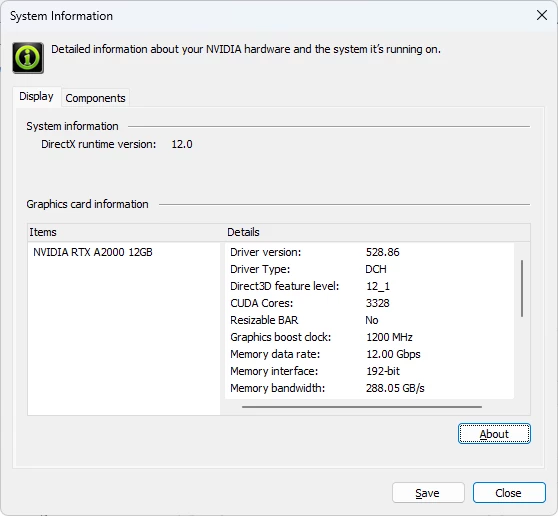


But whenever I open Adobe Premiere Pro, I get a driver compatibility issue:

Unsupported Video Driver
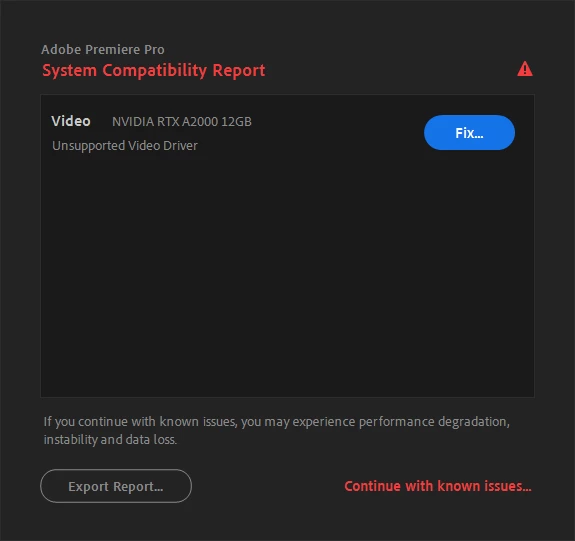


We speicifically selected a computer with a GPU that appears in the official Adobe Premiere Pro supported GPU list as seen here:https://helpx.adobe.com/premiere-pro/system-requirements/previous-versions.html


On Windows 11 Pro


Does anyone know what could be the problem?


This topic has been closed for replies.
Correct answer Ann Bens

Start with updating to the newest studio driver.

https://www.nvidia.com/Download/driverResults.aspx/211718/en-us/

2 replies

Peru Bob
Community Expert
Community Expert
September 25, 2023

What happens when you click on Fix?

Inspiring
September 25, 2023

Hi Peru Bob,

I did try clicking on that. It takes you to an Adobe troubleshoot page. The only relevant step was to check the driver is up-to-date. I thought it was, but apparently not. Problem is solved. Thanks

Ann Bens
Community Expert
Ann BensCommunity ExpertCorrect answer
Community Expert
September 25, 2023

Start with updating to the newest studio driver.

https://www.nvidia.com/Download/driverResults.aspx/211718/en-us/

Inspiring
September 25, 2023

Hi, Okay I was sure the driver was up-to-date, but installed the most recent driver and that made the issue go away.

I'm still dealing with some rendering issues, but probably not related. I'll post about that in a separate thread.

Thanks!