
Participant
February 24, 2019
Question

I dont see what I selected

  • February 24, 2019
  • 2 replies
  • 582 views

Hello,

I don`t know how this happened: When I select an object in the preview, there isn`t a blue frame around the object. I still can edit the object, but I don`t see it`s edges. This is the blue frame that I need to see:
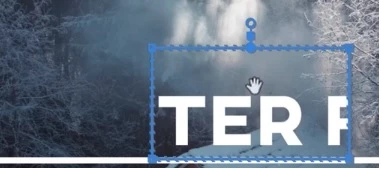
Using Adobe Pro CC 2019 on Windows

    This topic has been closed for replies.

    2 replies

    Legend
    February 24, 2019

    I've seen folks report this when the Program Monitor is too small, usually because one is working on a Laptop, whose screens aren't really large enough to do this job well.

    Resizing the Program Monitor larger usually solves the issue.

    Participant
    December 14, 2023

    You are correct, that was indeed the issue. I simply resized the screen, and I was able to see all the selected objects.


    gerikp
    Community Expert
    Community Expert
    February 24, 2019

    Looks like you are using a mask. If you are talking about manipulating the mask (blue frame) like making bigger, you'll need to do that in the Program window not the Preview window.

    Participant
    February 24, 2019

    Hi Gerik,

    thanks a lot for your answer. So this blue thing that shows you what you are selecting is apparently called a "mask"?

    I am working in the "program" window. And I can edit every object there: I type text, I move objects etc.

    But I dont see the blue mask anymore when I select something. This is a huge problem.

    Ann Bens
    Community Expert
    Community Expert
    February 24, 2019

    Go into the Effects Controls and look for a Mask and delete.