Participating Frequently
April 12, 2023
Question

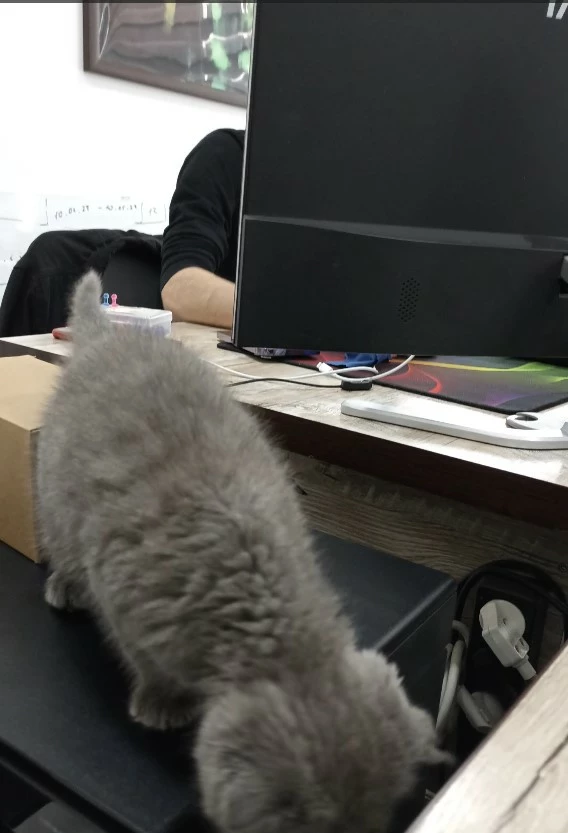
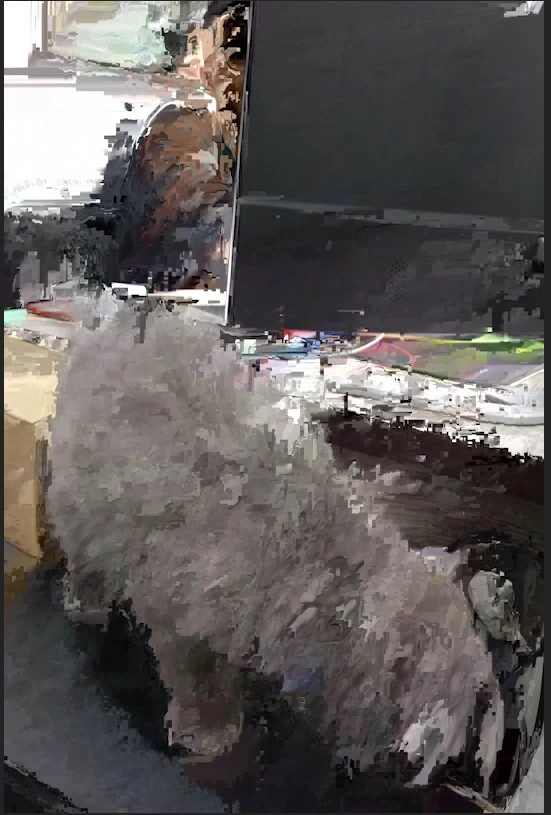
I have a problem with video quality when importing to Premiere pro
  • April 12, 2023
  • 5 replies
  • 882 views

Сan anyone explain why this is happening and how to solve it?

This topic has been closed for replies.

5 replies

Ronald Pronk
Inspiring
April 13, 2023

If you can place a small clip in an online server like google drive, dropbox any of those and share me the link i can have a go to see if i have the same issue 

Participating Frequently
April 12, 2023

Honor magicbook computer, amd ryzen 5 4600h series processor, radeon graphics, ram 16, win 11

i tried to delete media cache files and to change the file format with adobe media encoder.

Community Expert
April 12, 2023

If you are using a pc try updating the graphics driver.

Participating Frequently
April 12, 2023

1st one is after and the 2nd is before premiere pro on my compiuter.

Inspiring
April 12, 2023

We're gonna need some info to work with man. What are your computer's specs? Which gpu and driver are you running? What kind of footage are you importing (codec, which camera, etc)?

When exactly does it happen and what have you tried to fix it?

Participating Frequently
April 12, 2023

Honor magicbook computer, amd ryzen 5 4600h series processor, radeon graphics, ram 16, win 11

i tried to delete media cache files and to change the file format with adobe media encoder. 

Video was made on smartphone redmi note 10S

Participating Frequently
April 12, 2023

4k 3840x2160 9(16:9, 8.29mp) 30fps