



Karl_Whittaker9973
Participant
April 27, 2026
Answered

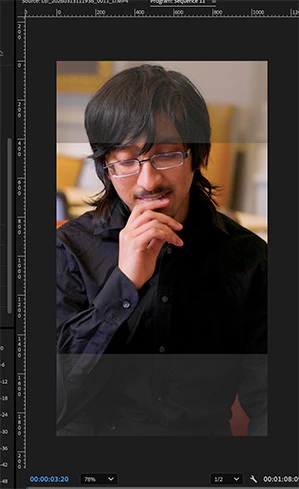
I'm editing a vertical video and have greyed out blocks at the top and bottom of my video, over the top of my clips. Not sure what i've done, but unable to get rid of them and they show up when I export the video
  • April 27, 2026
  • 3 replies
  • 20 views

I'm editing a vertical video and have greyed out blocks at the top and bottom of my video, over the top of my clips. Not sure what i've done, but unable to get rid of them and they show up when I export the video. How do I remove them?

    Correct answer Karl_Whittaker9973

    No thats the issue, I’ve just realised. I coppied the adjustment layers from the original horizontal edit so those ares top and bottom are just showing the original log footage 🤦.

    Thank you 

    3 replies

    Ann Bens
    Community Expert
    Community Expert
    April 27, 2026

    What do those two adjustment layers contain?

    Are they of the same dimension as the sequence settings.

    clips on the timeline dont look vertical as in your first screenshot.

    Karl_Whittaker9973
    Karl_Whittaker9973AuthorCorrect answer
    Participant
    April 27, 2026

    No thats the issue, I’ve just realised. I coppied the adjustment layers from the original horizontal edit so those ares top and bottom are just showing the original log footage 🤦.

    Thank you 

    Ann Bens
    Community Expert
    Community Expert
    April 27, 2026

    Post screenshot timeline with tracks expanded and showing.

    Karl_Whittaker9973
    Participant
    April 27, 2026


    Karl_Whittaker9973
    Participant
    April 27, 2026