



Victor5CD3
Inspiring
December 3, 2025
Question

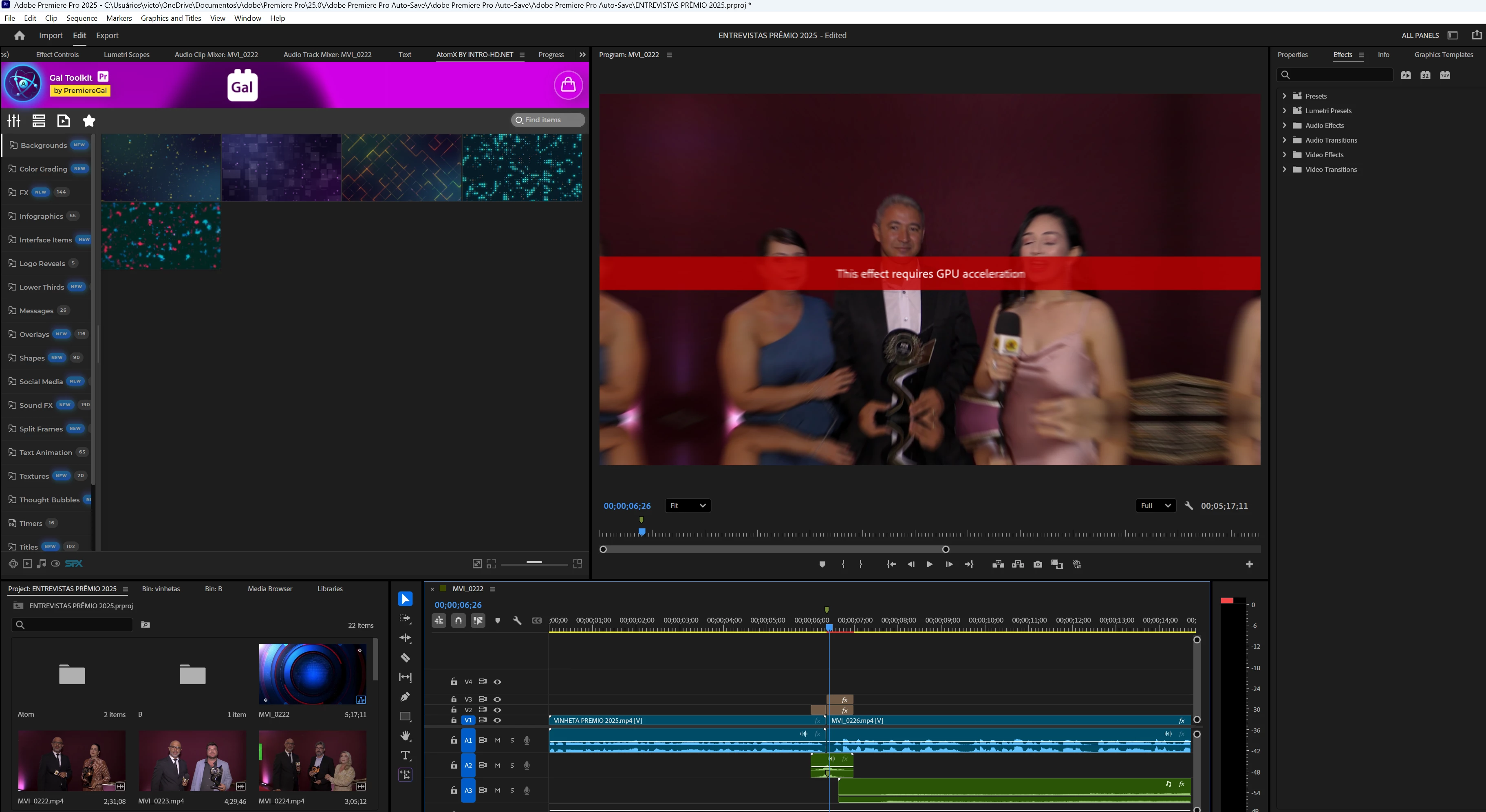
I'm getting an error requesting GPU acceleration after updates and downgrades in my Premiere?

  • December 3, 2025
  • 3 replies
  • 375 views

I don't know if it's another bug, but now my Premiere, in the Atom.x effects of the Gal Toolkit, when I apply transitions, is requesting GPU acceleration. Before, I didn't have this error, but now I am. My Premiere is version 25.5 and I don't know if it's because I was forced to downgrade from version 25.6. I don't know what to do. I've already updated my Nvidia drivers to the latest version of the Studio driver, but nothing has solved the problem.

My video card is an RTX 3060.867646iD4CB0EA933615F19.png
3 replies

Victor5CD3
Inspiring
December 3, 2025

I solved my problem, phew! I was going crazy. When I contacted Gal Toolkit support, I was advised to revert to a previous version. I was on v3.5, which only simplifies how transitions are applied without anything relevant. I was instructed to revert to v3.4, and everything worked perfectly. They are aware of this problem; the latest Adobe Premiere update causes this error with the plugin. Anyone experiencing this error should downgrade the plugin to version 3.4 until a fix is ​​released.

Build CPU Ryzen 5700X,64 GB ram,Nvidia geforce 5060 Ti 16 Gb,SSD nvme 1tb + ssd sata 2Tb HD Disc 2Tb Win11 24h2
Victor5CD3
Inspiring
December 3, 2025

Thank you, but that doesn't solve my problem. My files aren't on OneDrive; they're on an external SSD. I didn't have this error before updating to version 25.6, but due to export errors, I was forced to revert to version 25.5. Would deleting the media cache files folder solve my problem? I don't know what to do. I've always used the atom.x plugins and never had problems. If you could help me with a practical way to solve this error, I don't know what else to do. I've already lost 3 days of work having to downgrade to version 25.5. The atom.x transition effects aren't resource-intensive, and I'm very frustrated with this, especially since these plugins weren't cheap and now they're not working.

Build CPU Ryzen 5700X,64 GB ram,Nvidia geforce 5060 Ti 16 Gb,SSD nvme 1tb + ssd sata 2Tb HD Disc 2Tb Win11 24h2
Ann Bens
Community Expert
Community Expert
December 3, 2025

You project is buried deep within the main folder: too many auto save folders.

best is not to edit from One Drive but use external drive or a local drive.

You dont say which effect: if they VR effect read below.

FAQ: Avoiding Warnings Using VR Effects - Adobe Support Community