Participant
January 23, 2020
Question

I'm going insane with Premiere

  • January 23, 2020
  • 2 replies
  • 250 views

So guys, recently I switched from Mac to PC, in hope to get better preformance with afordable hardware. My build is:

  • Ryzen 7 3800x
  • 16GB Kingston DDR4, 3200Mhz
  • Nvidia RTX 2070 Super, 8GB
  • Kingston M2 A2000 500GB


If you ask me, looks like decent PC for video editing. But it seems like not, or I'm doing something wrong.

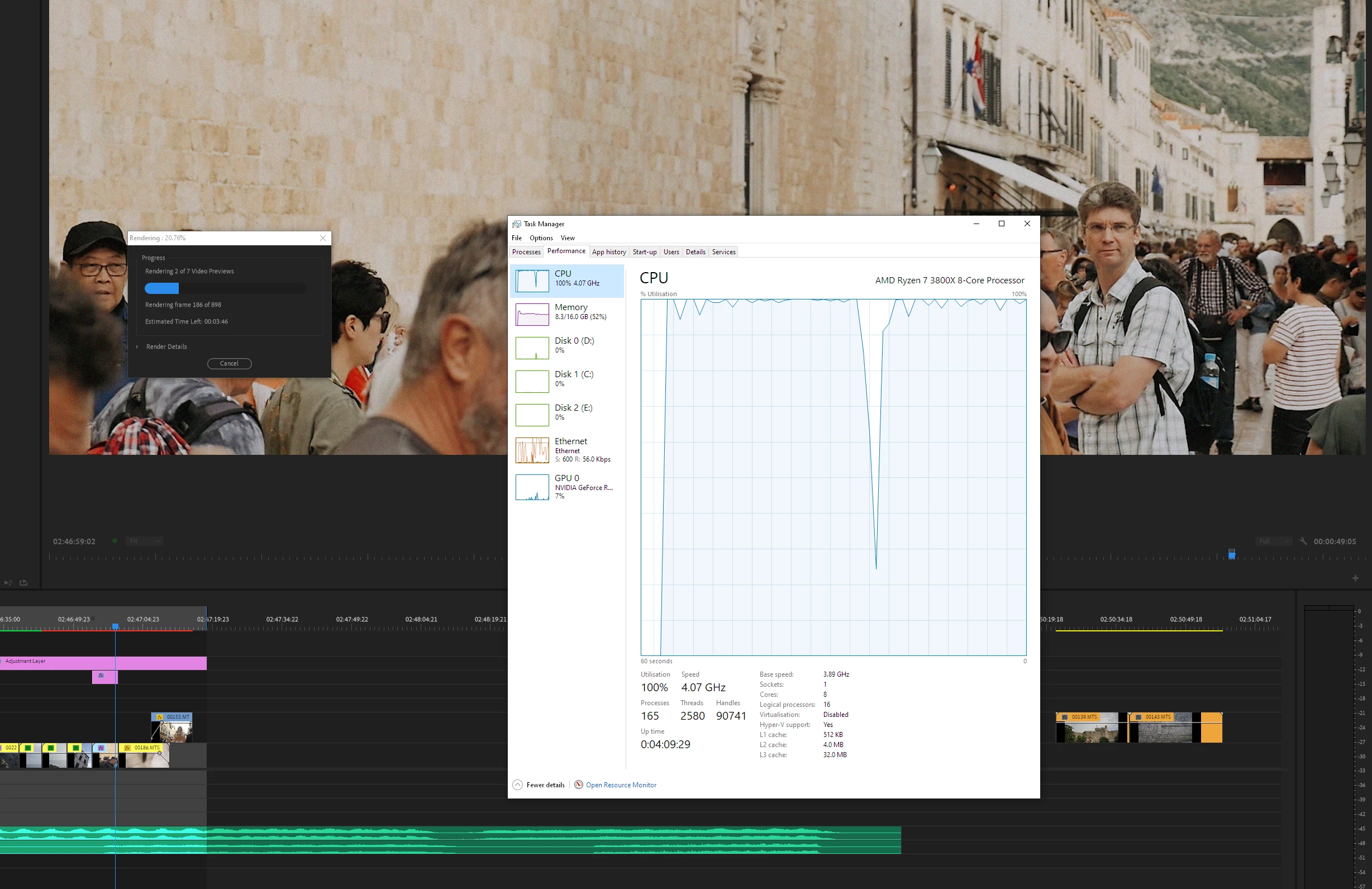
Anyway, simple color grading, on adjustment layer I applied LUT and noise (8%), and playback is choppy, laggy, even rendering in and out took about 2-3 minutes for 40 seconds of sequence. The thing is, in my working studio I'm using Mac Pro from 2010, with older hardware, and this operation runs smoothly, even rendering is faster.

So, I opened Task Manager, and all I can see that CPU is doing hard work, while GPU is resting (I know that Premiere use CPU much more than GPU, but there is bit of effects, I thought that GPU will jump in to help). 

Drivers are updated, CUDA is enabled, and still I think I'm missing something out.

Please help, I'm feeling depressed with money I spent for preformance I've got.
This topic has been closed for replies.

2 replies

MyerPj
Community Expert
Community Expert
January 24, 2020

I've noticed quite a few posters 'feeling' they have the necessary hardware and they should be getting this or that out of it. That's not really the way it works. You probably need to optimize in the first place. You have 165 processes running. That's actually not too bad, I can get mine up to 120/125 if I try. (Chrome loads a bunch of processes). But at idle a couple minutes after booting up I'm around 95, so I don't have all those little bits of software running in the background for each clock cycle.


2nd, you really should have 32GB or ram. I had 16gb in my 2011 build, so I think you are a bit under there. Better imo to have gone with at 2060 and 32gb, rather than the 2070 and 16.


Otherwise, proxies are great, they work really well, easy to deal with and there is no reason not to.

Participant
January 24, 2020

Thank you for reply. I'll keep an eye on processes in background. And yes, 32 is goal for me too, I'm planning to upgrade it soon, but still I don't think it will solve my problem. 

I read so much these days over the interent, and lot of them are using Intel CPU for Premiere, cause of dedicated integrated graphic, I guess, and everyhting runs smoothly. That is something I didn't consider or even know before I built my PC. All over the place was how Ryzen is eating Intel in bunch of stuff, including Premiere, but for now, all I can tell, that Ryzen is eathing my nerves 🙂

I'm using Premiere over the years, but these things will make me switch to another software, for sure.

John T Smith
Community Expert
Community Expert
January 23, 2020