


r0sest
Participant
February 11, 2026
Answered

I need help, my audio's visual on audio track is glitching

  • February 11, 2026
  • 1 reply
  • 12 views

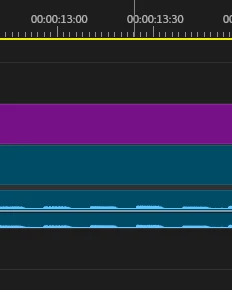
My audio track waveform is glitching. When I zoom out, suddenly the waveform is changes. Also the audio is not sync with what I’m hearing. Anyone know how to fix this?
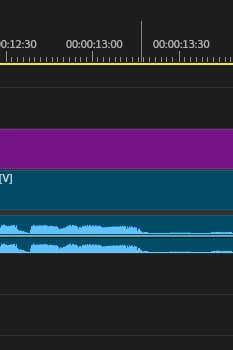
This is the correct waveform, sync with the audio that came out
It changed when I zoomed out


Correct answer PaulMurphy

You may need to regenerate your peak files.

  1. Close Premiere Pro.

  2. Hold Alt (Windows) or Option (Mac) while launching the application.

  3. In the Reset Options dialog, select Clear Media Cache.

Open your project again. The media cache and peak files will rebuild automatically.

1 reply

PaulMurphyCommunity ExpertCorrect answer
Community Expert
February 11, 2026

You may need to regenerate your peak files.

  1. Close Premiere Pro.

  2. Hold Alt (Windows) or Option (Mac) while launching the application.

  3. In the Reset Options dialog, select Clear Media Cache.

Open your project again. The media cache and peak files will rebuild automatically.

r0sest
r0sestAuthor
Participant
February 11, 2026

OMG, It works! Thank you so much!
