Participant
August 25, 2026
Answered

I need to export some promos for broadcast

  • August 25, 2026
  • 5 replies
  • 57 views

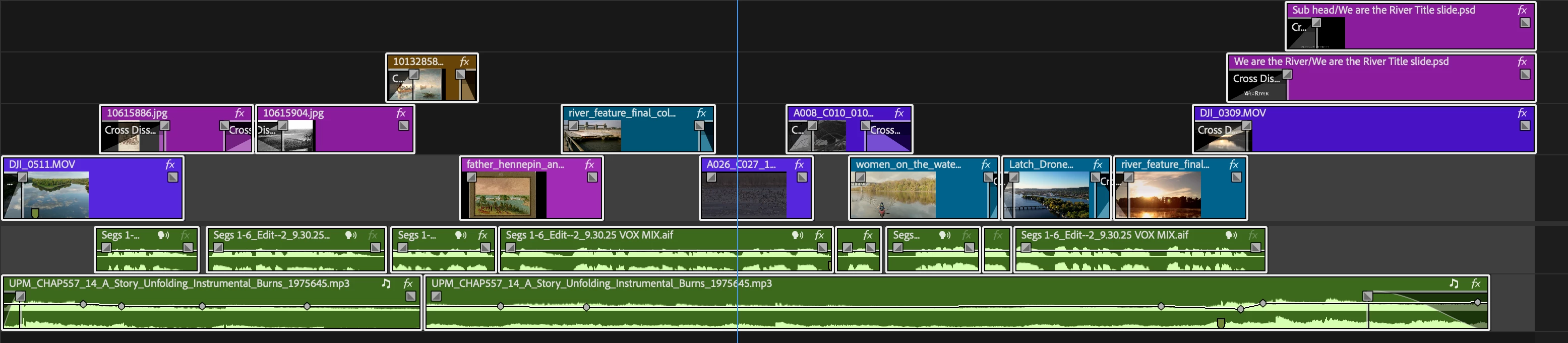
Help. I need to export some promos for broadcast and they require stereo audio on tracks 1&2 and mono audio on tracks 3&4. My timeline consists of two stereo tracks, voices on 1 and music & sfx on 2.

This seems like it should be easier then it is. What am I missing? Thanks!
 

    Correct answer PaulMurphy

    The setup for what's stereo and what's mono happens during export, not in your sequence settings.

    1. Create a multichannel sequence.
    2. Route each channel accordingly.
    3. In the Export Settings, expand Audio Settings, then expand More.
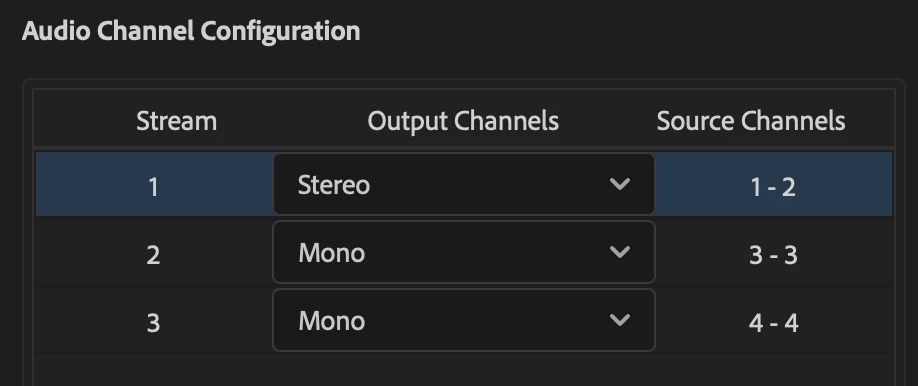
    4. Under Audio Channel Configuration, set Stream 1 to Stereo.
    5. Click the + button underneath to add a mono channel, then click it again to add a second mono channel.


    1.  

    5 replies

    R Neil Haugen
    Legend
    August 26, 2026

    I think you might need to make a new sequence with those audio specs, then drag/drop or copy/paste the current sequence to that one. Changing audio channels after working on a sequence isn’t really a ‘thing’ in Premiere.


    Paul though would have the best complete set of directions.

    Everyone's mileage always varies ...
    Participant
    August 26, 2026

    Thanks, I understand that part. I think the problem is that I can’t set up both stereo output and multi-track output for the same sequence. Maybe I need to change all of my source tracks to mono and pan my output of 1 and 2 left and right, and put 3 and 4 straight up.

    PaulMurphyCommunity ExpertCorrect answer
    Community Expert
    August 28, 2026

    The setup for what's stereo and what's mono happens during export, not in your sequence settings.

    1. Create a multichannel sequence.
    2. Route each channel accordingly.
    3. In the Export Settings, expand Audio Settings, then expand More.
    4. Under Audio Channel Configuration, set Stream 1 to Stereo.
    5. Click the + button underneath to add a mono channel, then click it again to add a second mono channel.


    1.  

    Participant
    August 26, 2026

    Thank you for your help. Here’s what the specs are that they list.


    Audio: Uncompressed | PCM

    Audio Format:  Stereo 1&2 / Mono 3&4 (must have four tracks of audio present)
    Average Loudness:  -24 LKFS +/- 2 LKFS

    Average Dialogue Level: -24 LKFS +/- 2 LKFS

    Audio Note: The audio levels on Ch 1&2 and Ch 3&4 must match or be within 1 db of each other
    Sample Rate - 48 KHz
    Audio Bit Depth - 24

    Community Manager
    August 25, 2026

    Hi there, John,

    Thanks for the post. Your timeline looks straightforward, but I'd like to make sure we understand the broadcaster's delivery requirements before recommending the exact audio routing.

    Could you post the audio portion of their delivery specifications, particularly what they require on channels 1–4? That will help determine the correct multichannel sequence and output routing.

    Premiere does support routing tracks to specific channels in a multichannel output. Here's the current documentation:

    Configure track output channel assignments in Premiere

    I'm also going to ask one of our audio experts to take a look and to provide some workflow advice.
    @PaulMurphy - could you assist?

    Thanks,
    Kevin