Inspiring
October 18, 2025
Question

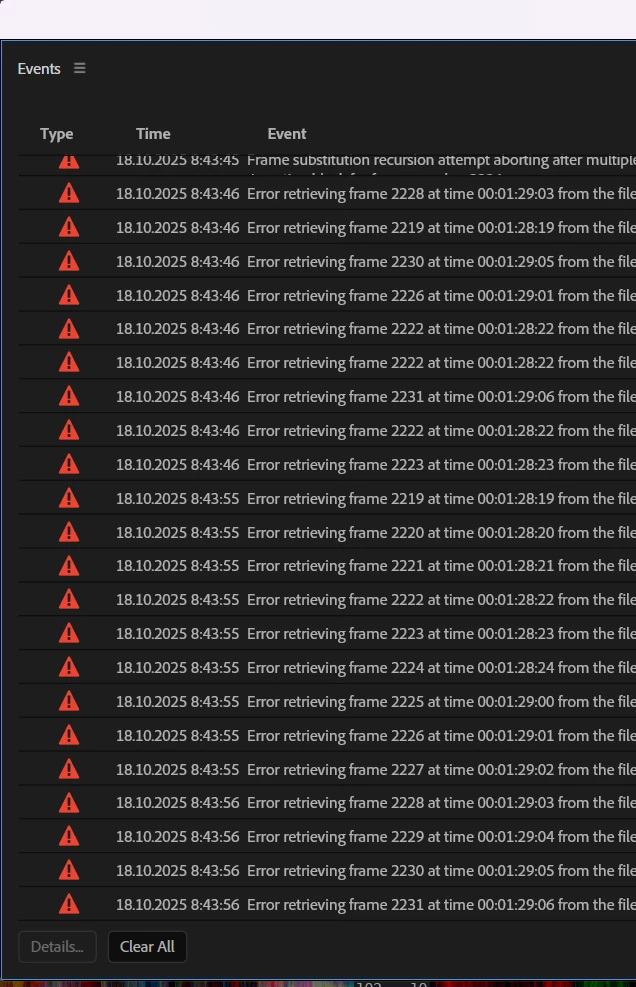
I need to work! What's going on? What's the problem?
  • October 18, 2025
  • 1 reply
  • 149 views

These windows appear and the sound disappears.

 

1 reply

Warren Heaton
Community Expert
Community Expert
October 18, 2025

Hi @Paul_Gringo:

Yeah, frame substition errors can be very frustrating.  

What is your source footage?

I would try transcoding it to Apple ProRes 422 LT or Apple ProRes 422 HQ using Shutter Encoder (dontationware - free if you set the donation slider to the left on the download page), and then right-click the videos in Premiere Pro and use Replace Footage to swap the current files for the transcoded ones. 

Inspiring
October 19, 2025

I don't have time for this. Why do all other editing programs work fine, but here I have to spend my time for transcoding ? Maybe it would be better to do a NORMAL update at least once!


Warren Heaton
Community Expert
Community Expert
October 20, 2025

Why should we have to spend our time transcoding is a very good question.  The format that our device records or the format that we've downloaded may be a good format for playback, but that doesn't mean it's a good format for editing.  Sometimes transcoding is just a good troubleshooting step.

Here's a list of file formats that are supported in Premiere Pro.
https://helpx.adobe.com/ie/premiere-pro/using/supported-file-formats.html

If the format you're using is on that list, Premiere Pro should at least be able to import the file; however, for smooth playback and good editing performance, that can depend on whether our workstation meets or exceeds what's require for the corresponding format.

Transcoding isn't unique to Premiere Pro.   Other NLEs like Media Encoder, Vegas, Resolve, Final Cut Pro each have a list of supported file formats and hardware requirements.  While Premiere Pro calls formats that shouldn't need transcoding "Smart Rendering formats", some other NLEs refere to them as "Optimized formats".