



I think I'm experiencing a bug with the step forward/back hotkeys and a specific binding. Looking for second opinions.
Hey all! I'm experiencing a really weird quirk in Premiere that I think might be a bug? Looking to see if others can confirm it as a bug, or show me a fix.
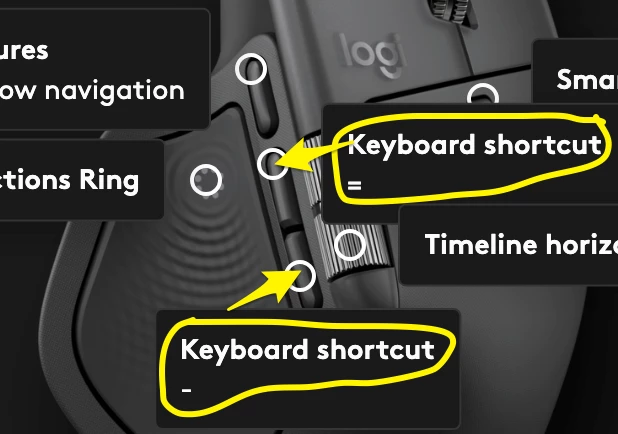
For 4 years, I've used a keybind system in Premiere that incorporates custom mapping for the thumb-side buttons of my mouse. I currently use a Logitech Mx Master 4, but this has worked across various mice and mapping softwares. Using the "Logi Options+" software, I have ( = ) bound to the front thumb-side button, and ( - ) bound to the back thumb-side button (shown in an attached image). I use these to zoom in ( = ), and out ( - ).
I also use modifier keys with these buttons for different commands. These modifier mappings are as such:
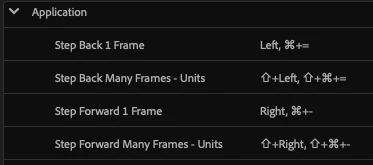
( Cmmd ) + ( = ) : Step Back 1 Frame*
( Cmmd ) + ( - ) : Step Forward 1 Frame*
( Cmmd ) + ( Shift ) + ( = ) : Step Back 5 Frames
( Cmmd ) + ( Shift ) + ( - ) : Step Forward 5 Frames
( Option ) + ( = ) : Nudge Clip Selection Left 1 Frame
( Option ) + ( - ) : Nudge Clip Selection Right 1 Frame
( Option ) + (Shift) + ( = ) : Nudge Clip Selection Left 5 Frames
( Option ) + (Shift) + ( - ) : Nudge Clip Selection Right 5 Frames
( = ) represents movement on the timeline to the left, and ( - ) to the right. ( Cmmd ) + ( =/- ) moves the playhead, ( Option ) + ( =/- ) moves the selected clip, + ( Shift ) dictates the movement as 5 frames rather than one.
I have used this shortcut system for years, and every one has worked without a problem.
However, some time ago (maybe 6 months? I couldn't say exactly when), the Step Back/Forward commands* ( Cmmd ) + ( =/- ) has just stopped working. Every other keybind besides these works fine, including stepping forward or back 5 frames (( Cmmd ) + ( Shift ) + ( =/- )).
Even weirder still, if I swap my current bindings of zooming and stepping forward/back 1 frame with each-other, so that zooming is done with ( Cmmd ) + ( =/- ), and stepping back/forward one frame with just ( =/- ), everything works as intended. Only when I try to use the Step Back/Forward command with ( Cmmd ) + ( =/- ), does the command not work.
I know this is not a Logi Options+ issue, since every other bind works. I know it’s not a system issue, because while ( Cmmd ) + ( =/- ) does not work, ( Cmmd ) + ( Shift ) + ( =/- ) works (also because swapping the zoom and step 1 frame keybinds also works on both ends). Oh and I don't have audio time units enabled in the timeline.
Premiere v26.0.2, I experienced the same issue on v25.4.0 as well.
2020 M1 Mac. 8-core processor with 16gm RAM. On-board memory.
 AdChoices