
martino38002999
Participant
December 19, 2021
Question

Icon view problem

  • December 19, 2021
  • 4 replies
  • 1497 views

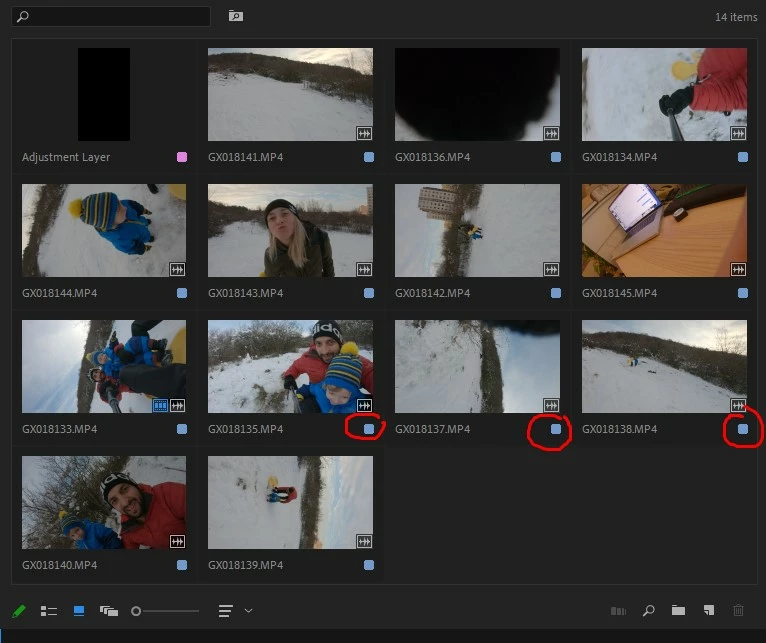
Hello everybody. I am used to work in "Icon View", in Premiere Pro. Really liked, that you can see actual footage and its duration. But after last update or patch, Adobe change this and now instead of duration its just color label.

Can you help me please? I would love to bring duration back (or least add this as an option).


Thank you very much!
This topic has been closed for replies.

4 replies

Ann Bens
Community Expert
Community Expert
December 19, 2021

If you hover over the icon you get a popup or whatever its called.

Shows the duration of the in and outpoint: not ideal.

this works only in icon view, not freeform

TAPE Production
Inspiring
December 19, 2021

I have same problem. I can't see clip duration. I also tried reset preferences and cache, it didn't solve this problem.

Version 22.1.1


martino38002999
Participant
December 19, 2021

Has anyone got a solution for this annoying problem? Thanks

gerikp
Community Expert
Community Expert
December 19, 2021

Strange. It looks like your panel is in "Freeform" view, but your icon indicator on the bottom of the panel shows that you are in Icon View.  I've not upgraded or updated to the newest versions yet.


Perhaps try resetting your workspace. Window > Workspaces > Reset to Saved Layout.


Also, try resetting your preferences.  https://community.adobe.com/t5/premiere-pro-discussions/faq-how-to-reset-trash-preferences-in-premiere-pro/td-p/8236158

Community Expert
December 19, 2021

I would try re-setting preferences:

  1. Press Alt (Windows) or Option (Mac OS) while launching Premiere Pro. ...
  2. To reset preferences and plug-in cache at the same time, hold down Shift-Alt (Windows) or Shift-Option (Mac OS) while the application is starting.
Participant
November 5, 2024

Thank you! #1 fixed my problem