Inspiring
March 12, 2026
Answered

Images with wrong FPS

  • March 12, 2026
  • 1 reply
  • 36 views

Hello.
I’m using Premiere 26.0.2 on Mac OS 15.7.4

I like to check clip(s) duration in the timeline with the info tab. I discovered today that Premiere interprets still images with the wrong FPS and that it affects the duration info.
For instance, in a 23,976 fps timeline, a png file is tagged 25fps in the info window. The duration that is shown is not correct.
I don’t know if it’s a known issue.

Thanks!
Max

    Correct answer Ann Bens

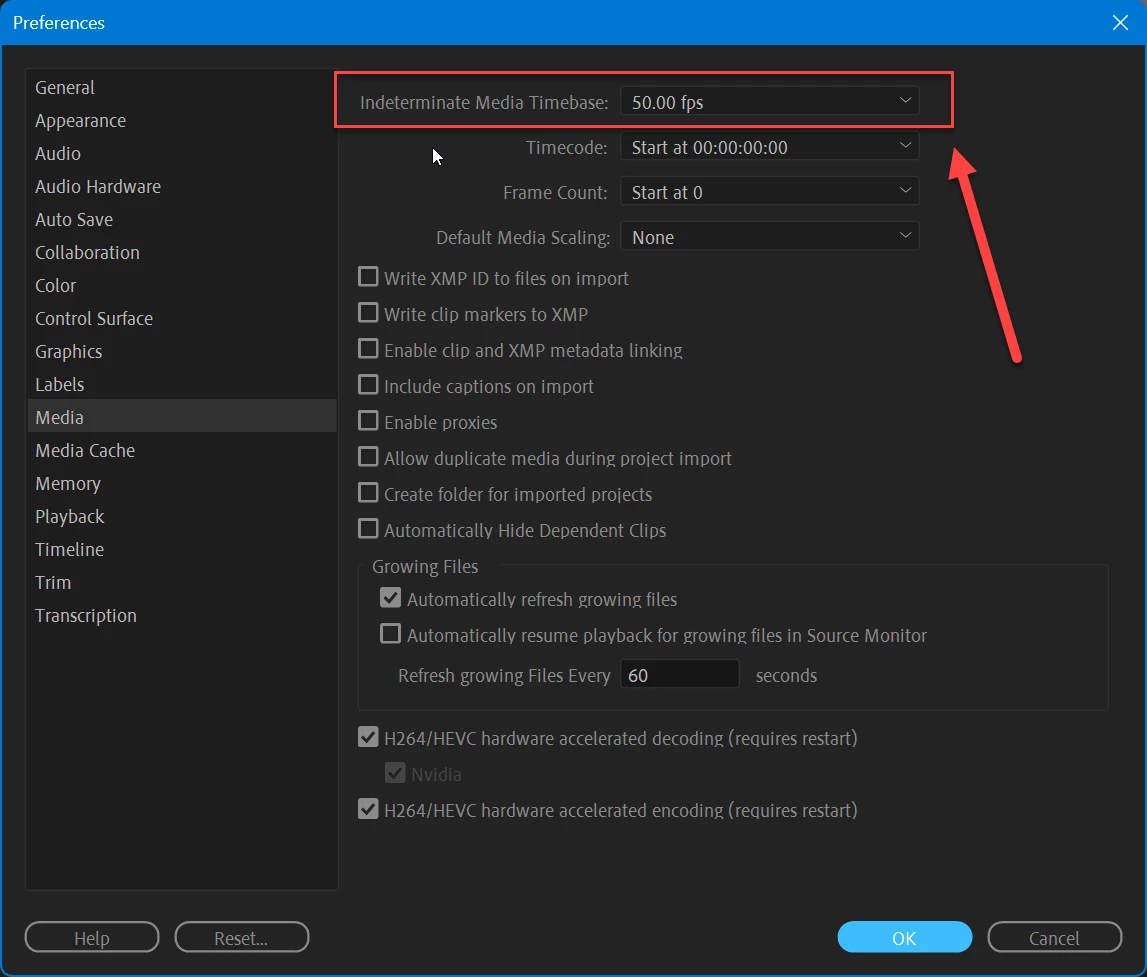
    Set this to the same framerate as your timeline

    1 reply

    Ann Bens
    Community Expert
    Ann BensCommunity ExpertCorrect answer
    Community Expert
    March 12, 2026

    Set this to the same framerate as your timeline

    Inspiring
    March 13, 2026

    Thanks Ann, never thought of that!
    It’s also good to know that you need to set this before importing assets.
    I think it’d be great if Premiere automatically set the fps of stills to the current timeline fps.