
jaydw
Inspiring
January 8, 2020
Question

Import file (Not Responding)
  • January 8, 2020
  • 2 replies
  • 1122 views

Can anyone tell me why Premiere just sits there when I try to import a video file and eventually crashes...If I am paying money for this program each month..the one time I want to use it, it should at least be working. Thanks 

This topic has been closed for replies.

2 replies

R Neil Haugen
Legend
January 8, 2020

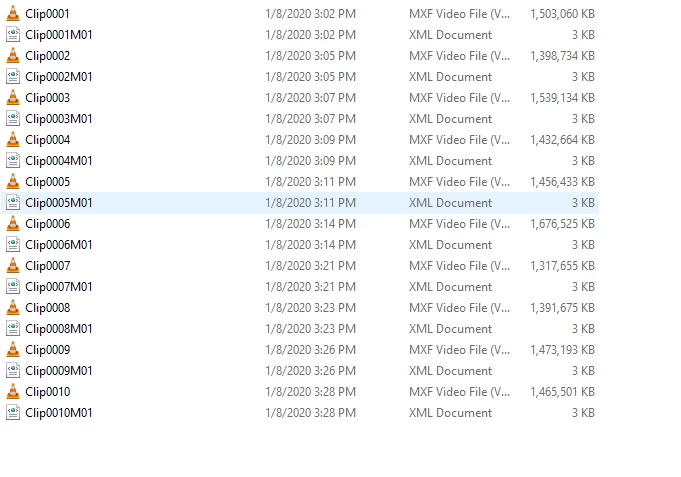
What camera created those files? I can see each has an XML file with it.


Depending on exactly how and what created those files, there may be other data bits that Premiere needs to 'see' to be able to work with them. For example, AVCHD formats typically need to have the whole card folder structure uploaded intact onto the computer for the proper metadata to be available for Premiere to use the files properly.


Neil

Everyone's mileage always varies ...
jaydw
jaydwAuthor
Inspiring
January 9, 2020

They were created with Sony FS5. I could not get premiere to open again after I reset the preferences...uninstalled and installing again..hopefully this fixes it. If not I am just going to give up and use my friends FCP. Thanks for tips, but it always results to re-installing..Premiere creators need to put the horse before the cart and make a product that just works before upgrading what they have. I am glad I don't use this program to make a living and it is just a hobby or I would be fired. 

jaydw
jaydwAuthor
Inspiring
January 9, 2020

Disregard, ...it appears when transfering the file it did not copy all the way even though it says the file size is the same. I noticed this while playing in the VLC player it would hang. Seems problem is fixed and was not premiere that was the issue. Very frustrating when you get read information and it is not really what is there. Thanks

R Neil Haugen
Legend
January 8, 2020

Not without some information from you first ... especially as to what the media file is you're trying to import (format/codec) ... the method you're using to do the import process ... and where on the computer that file 'lives'.


Neil

Everyone's mileage always varies ...
jaydw
jaydwAuthor
Inspiring
January 8, 2020

I just added a photo of the files I want to import to main message. I will try to put on other drive, thanks for tip on that info. Currently they are on the C:/drive on desktop. 

jaydw
jaydwAuthor
Inspiring
January 8, 2020

Yeah, same issue. I tried to delete the media cache files..guess I will just need to re-install Premiere which seems like a huge waste of time, but since the program can't work when you need it to, it seems to be the only way things ever eventually get done. I even had to re-install windows once, I have no idea why the program can't just do the basics we pay it to do when we need it without having to go to such extremes each time we want to create a new video.