
Danko_Cimbri_Photography
Known Participant
August 11, 2019
Answered

Imported .mogrt files doesn’t appear in Essential Graphics Tab

  • August 11, 2019
  • 11 replies
  • 34595 views

Hi,

today my problem is:

when I import an Essential Graphics made with AE (Graphics/Install Motion Graphic Template.../myfile.mogrt and Open) this doesn’t appears in the Essential Graphics Tab (Windows/Essential Graphics).

In my Tab, I only see the old .mogrt files that I have imported in the past. The new “my file.mogrt” template isn’t in this list.

How I make it visible? When I charge an another time the template, a warning window appears and tell me “Are you sure you want to overwrite the myfile.mogrt template?”

This means that the file is already in the folder but even if I look for it, it doesn’t appear.

Let me know!

Thanks
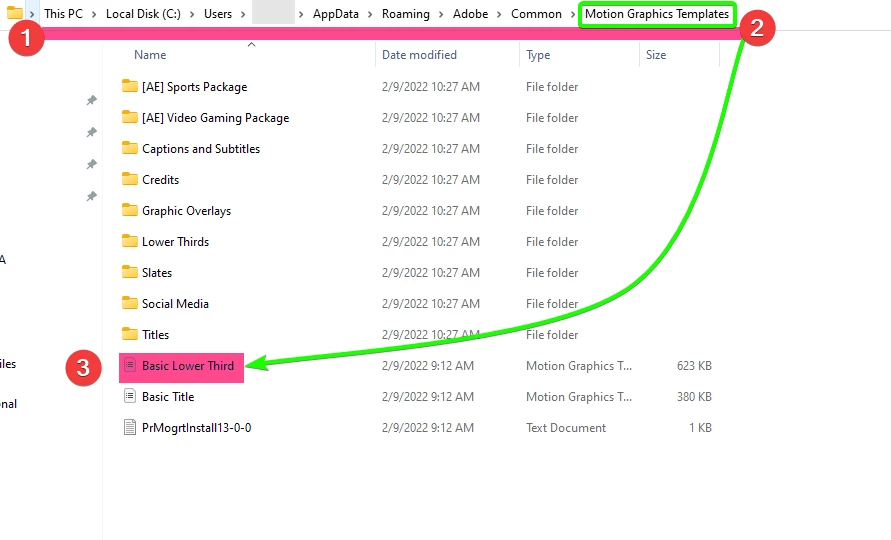
    Correct answer Baffy19

    Delete yours .MOGRT from the folder and install it yourself using the following path in the screenshot:

    11 replies

    MyerPj
    Community Expert
    Community Expert
    August 11, 2019

    At some point Adobe changed folder name holding Essential Graphics from "Essential Graphics" to "Motion Graphics Templates"

    Pasting this shortcut into Windows File Explorer will take you to the containing folder:

    %UserName%\AppData\Roaming\Adobe\Common

    Just yesterday I copied a Mogrt into my Motion Graphics Template folder, (via Windows), started PP (13.1.4) and there it was.

    So, nothing else, just put the mogrt into that folder. If you have both, for now put it into the Motion Graphics Template first and try PP, if you don't see it put it into the Essential Graphics folder and try PP again.

    Danko_Cimbri_Photography
    Known Participant
    August 11, 2019

    I already have this file in the folder but Premiere Pro doesn't find it.

    No matching search results.

    MyerPj
    Community Expert
    Community Expert
    August 11, 2019

    Check the Local and Libraries box, try "untitled' also, could be listed under that.