
Known Participant
July 30, 2019
Question

Imported MOV files wrong duration and skipping frames

  • July 30, 2019
  • 2 replies
  • 1953 views

Hello

I am using Premiere Pro v13.1 Magician

I am running the following:

Model Name: Mac Pro

Model Identifier: MacPro6,1

Processor Name: 8-Core Intel Xeon E5

Processor Speed: 3 GHz

Number of Processors: 1

Total Number of Cores: 8

L2 Cache (per Core): 256 KB

L3 Cache: 25 MB

Hyper-Threading Technology: Enabled

Memory: 16 GB

Boot ROM Version: 130.0.0.0.0

SMC Version (system): 2.20f18

Illumination Version: 1.4a6

I have captured two videos using PP capture module.  The resulting files are successfully shown in the Project, however, they are considerably shorter in duration than expected, and include missing/skipped/ frames, with some frames appearing out of sequence. PP reports one of the captured videos thus:

Type: MPEG Movie

File Size: 23.07 GB

Image Size: 720 x 576

Frame Rate: 25.00

Source Audio Format: 48000 Hz - compressed - Stereo

Project Audio Format: 48000 Hz - 32 bit floating point - Stereo Total

Duration: 00:54:15:09

Pixel Aspect Ratio: 1.0

Alpha: None

Video Codec Type: MPEG4 4:2:0

MAC OS reports the same MOV file in Finder thus:
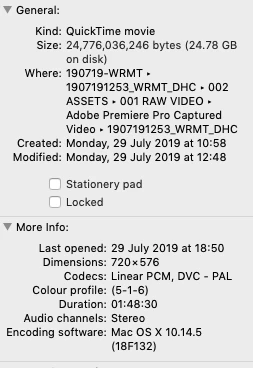
Significantly, PP reports a slightly shorter GB size (23.07GB v 24.78GB), and significantly, there is a huge difference in the actual duration and PP's interpretation (00:54:15:09 v 01:48:30).

The MOV files play perfectly when previewed in Finder and when opened in Quicktime

I've tried pretty much everything. I have insured the timeline setting match the video (although this makes no difference as the Project Window shows the incorrect duration even before creating the timeline.  I have tried changing the file extension to .mp4 and .mpg. I have tried creating proxies...

In the end, as I am trying to meet a deadline for a client, I have had to use a third party convertor to create a new MOV file from the original PP captured file, sadly with loss of quality which, given this is original VHS material, isn't helpful.

I have tried the captured MOV files in AME, but the software reports the same incorrect durations.

Any help would be much appreciated.

Thank you.

This topic has been closed for replies.

2 replies

jmshrrsnAuthor
Known Participant
March 3, 2020

I am still having this issue -- I can't be the only one?!


Is this a known bug?

Participant
April 16, 2021

I'm also having this issue out of no where with literally all of my video files.  I was editing this morning and it just began having this issue.  I have read all troubleshooting with import settings, frame rates audio, speed/gain, there is no setting that I can think of that I have changed or that could apply to all imported mov/mp4 files.  It has to be a universal setting or a bug but unbenowknst to me.  I am going back to old projects even (with project settings saved) and still encountering this? I edit daily so this is a massive pain and dont know what else to do but to call them on the phone to figure this out.  Reinstalling also did not fix this issue.  

Ann Bens
Community Expert
Community Expert
July 30, 2019

If you capture footage in Premiere file size for 1 hour should be around 13 gig.

How did you actually capture the footage: what is your setup?

In the Preferences there is a setting for dropped frames.

Should not the video codec be mpeg2?

jmshrrsnAuthor
Known Participant
July 30, 2019

Thanks Ann for your response. The video capture comes from a SVHS player via a DVCAM deck, which acts as the interface.  The capture module is set up so the video files are captured to the same project folders. I don't think this is really about the capture process as I am getting correctly captured MOV files, with no skipping, missed frames or incorrect durations etc. (they playback perfectly in Quicktime Player and VLC). The capturing is set to stop when dropped frames are detected... I think... (I can't check right now as I'm in the middle of a long capture.) I have not had this problem before when capturing via PP and I have been processing SVHS tapes in this way for nearly three years.  It is the first time I have seen such a serious mismatch between the actual captured video and how that file is interpreted by PP. Thanks again for taking the trouble to respond so swiftly.

Ann Bens
Community Expert
Community Expert
July 30, 2019

Maybe you should not stop capture on dropped frames?

I never did: just edited them out.