Participant
March 2, 2022
Question

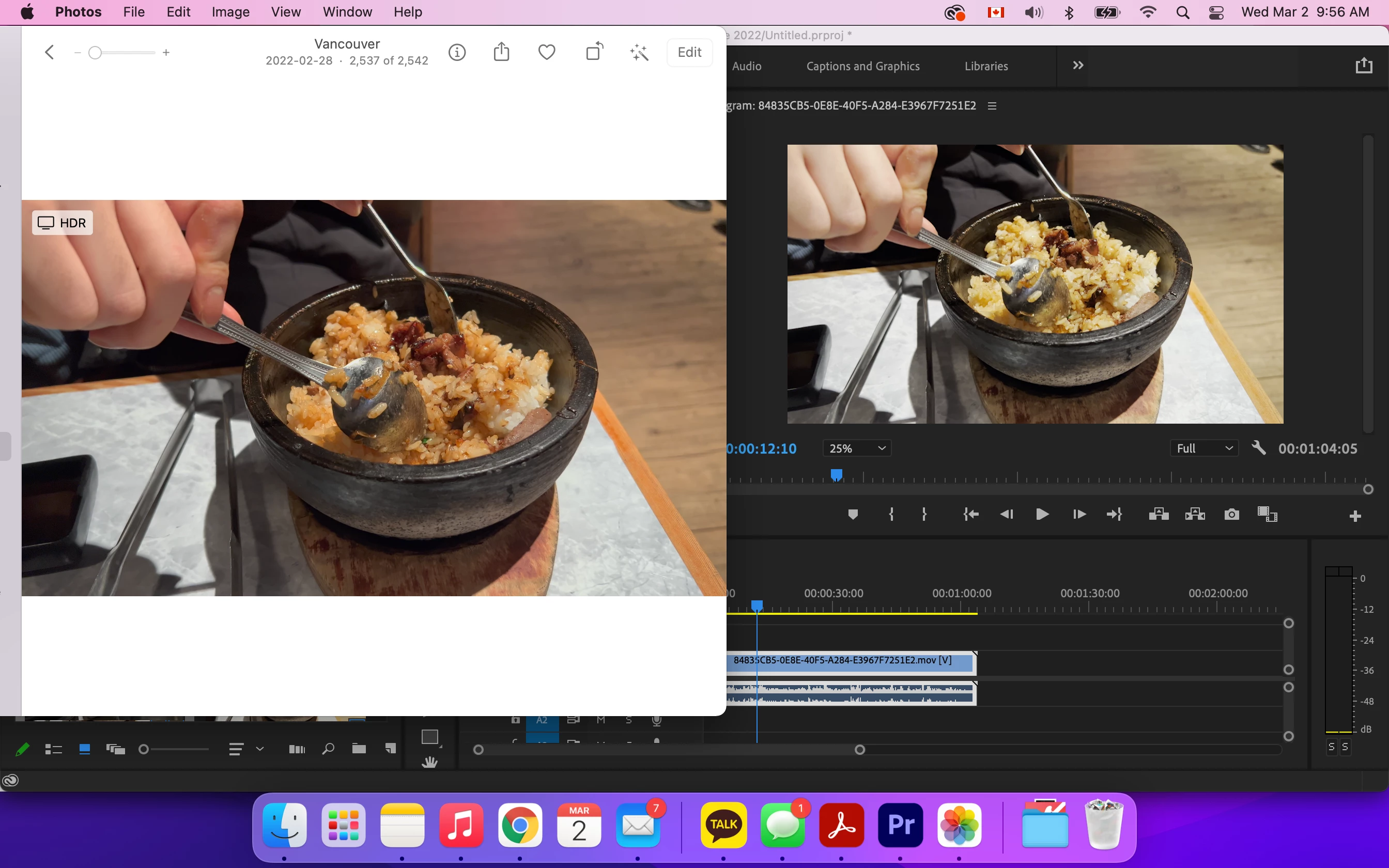
Imported video colour and contrast and dramatic after being imported to the app.

  • March 2, 2022
  • 3 replies
  • 238 views

This problem  never happened before but I recently noticed the dramatic difference... 

Would anyone know? I tried searching for help but I don't think it is the "display colour management" problem or the gamma problem.. I think this is something else. It appears normal on my photos app but when I import it it changes the contrast and colour and gives an ugly mood. 

Please help!! 😞


This topic has been closed for replies.

3 replies

Participant
March 4, 2022

For some random reason, I accidentally imported the same video from my iPhone Photos app to my MacBook desktop and it normalized the filter of the video and fixed the problem. 

So I just had to save the same videos twice and the hdr mode disappeared and everything is working as before.

I don't know why that fixed the problem? but it did! Anyways, thank you, everyone.

R Neil Haugen
Legend
March 2, 2022

As Ann's link will discuss mostly ... it's because Pr2022 has a completely rebuilt underlying color processing and management system. It was totally Rec.709/SDR before, it isn't anymore. And while the changes are mostly working, some default behaviors are reversed from previous versions. And a few things are acknlowledged broken and awaiting a fix.


Basically, if you are working with most iPhone media, and in Premiere working in an SDR/Rec.709 timeline, you need to go to the clips in the bin. Right-click/Modify/Interpret Footage, and set the Override option to Rec.709.


Then make sure your sequence color management option is also set to Rec.709 in the Sequence settings dialog.


Neil

Everyone's mileage always varies ...
Participant
March 4, 2022

Thank you for the advice, I actually tried everything the youtube video said and followed your instructions but the video colour is still off. I don't know what I am doing wrong..  I really want to just edit my videos asap and the filter is totally changed 😞 Please help Please!!

R Neil Haugen
Legend
March 4, 2022

First, give up matching Premiere to QuickTime Player. Apple created their ColorSync color management utility with an odd mis-use of Rec.709 video standards. They don't apply the second of the two required transforms, and they use a gamma of 1.96, rather than 2.4.


So they display ALL Rec.709 video files incorrectly. QT player, Chrome and Safari browsers all use ColorSync, and have the same problems. VLC player and Firefox browser typically don't use ColorSync, and may get a more correct image.


And ... I'll bet you didn't know that everything you watch via QT player or Chrome does the same thing you're seeing here ... between the original (think what it looks like in Pr) and what you see in QT player.


Neil

Everyone's mileage always varies ...
Ann Bens
Community Expert
Community Expert
March 2, 2022