


Inspiring
Jan 23, 2023 10:23 PM UTC
Answered

Importing a DNxHR 444 with alpha channel from Resolve - "error retrieving frames" problem

My team has just come across a problem and we can't figure it out. A colorist has provided us with a DNxHR 444 export from Resolve with alpha channel (unfortunately can't export ProRes from Resolve), and we are having problems importing it back into Premiere.


When we import the DNxHR, this is what we are seeing:
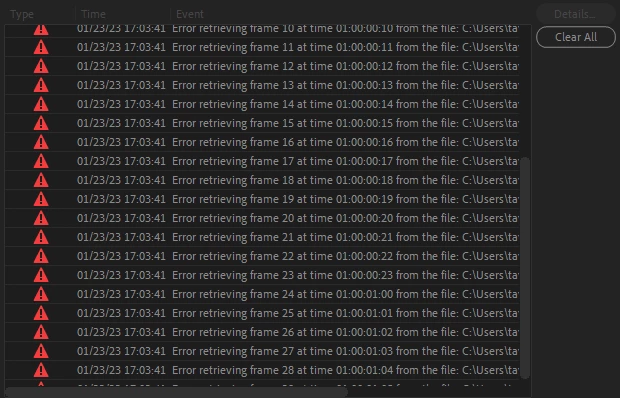
 

This happens on .mov's and .mxf's. If alpha channel is NOT enabled, it works fine. It's only if alpha is enabled.

Anyone know what the problem is here? Is this a problem on Premiere's end or on Resolve's end? What is the best way to get a high quality color export with alpha into Premiere from Resolve?
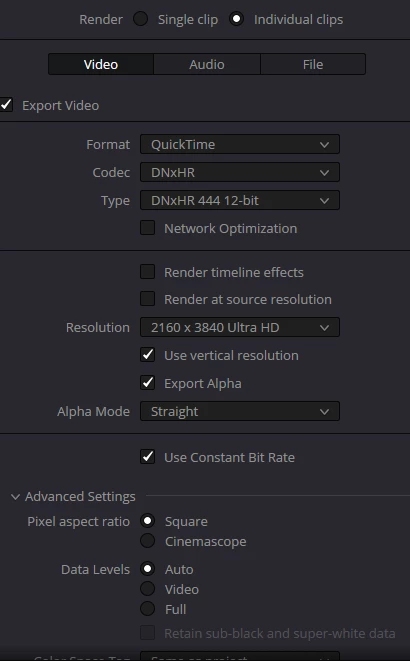
 

harit33959153f287Correct answer
Participant
Jan 20, 2025 5:26 PM UTC

guys i figured it out! simply change your "alpha mode" to "straight" from "pre-multiplied" that seems to be the problem and along with that i also turn off my "enable flat pass". and then no matter what codec you render from i.e. MXF or Quicktime, IT WILL ALWAYS WORK!

19 replies

harit33959153f287Correct answer
Participant
Jan 20, 2025 5:26 PM UTC

guys i figured it out! simply change your "alpha mode" to "straight" from "pre-multiplied" that seems to be the problem and along with that i also turn off my "enable flat pass". and then no matter what codec you render from i.e. MXF or Quicktime, IT WILL ALWAYS WORK!

Translate
Participant
Jan 20, 2025 4:41 AM UTC

Was this ever solved? It is still an issue.

Translate
Participant
Jan 21, 2025 5:12 AM UTC

check out my reply, i figured out a method


Translate
Participant
Mar 15, 2023 9:37 AM UTC

Hey! I have been struggling with this too, but found a workaround!

Export in Cineform RGB 16-bit with alpha. That will open in PR and ME.

Translate
Waldorf & Statler
Inspiring
Mar 15, 2023 9:43 AM UTC

Cineform what?

Do you mean DPX?

Translate
Participant
Mar 15, 2023 10:29 AM UTC

Quicktime GoPro Cineform.

Translate
Inspiring
Jan 26, 2023 6:49 PM UTC

bump

Translate
Kevin J. Monahan Jr.
Legend
Jan 26, 2023 6:55 PM UTC

taylor,

Sorry about the error. To proceed with troubleshooting, please give full details about your computer system. Kindly include info about CPU, GPU (+driver version, if on Windows), RAM, and your drives (and how they are connected to your system). With that info, we may be able to solve the issue.


Cheers,

Kevin

Translate
Kevin Monahan - Sr. Community and Engagement Strategist – Adobe Pro Video and Audio
Inspiring
Jan 26, 2023 7:00 PM UTC

It doesn't seem to have anything to do with my specific computer unfortunately, as we tried this on 3 separate computers, on with an rtx 3080, and got the exact same result each time.


Either way though, here ya go!


Ryzen 3900x 12-core

64gb RAM

AMD Vega

1x 2TB NVME M.2, 1x 4TB NVME M.2

(footage was done all on internal drives, no external)

Windows 10, newest version

Translate