

edit2j47225339
Known Participant
January 31, 2020
Answered

Importing a folder with Extendscript adds extra nameless bin that I don't want

  • January 31, 2020
  • 1 reply
  • 1809 views

Hi, I'm writing a script to automatically import files rendered from After Effects into Premiere with Extendscript. All my projects have the same folder structure. The folder I want to import is "AE/16x9/" and I import it into a bin called "AE" which is created by the script if it doesn't exist yet. I got it working so far with this code:


importae: function() {
		app.enableQE();

		var projPath	= app.project.path;
		var projName = app.project.name;
		var projFolder = projPath.slice(0,(projPath.length-projName.length));
		var importFolder = projFolder + "AE/16x9/";

		var myFile = [];
		myFile[0] = importFolder;

		var nameToFind	= 'AE';
		var targetBin	= $._PPP_.searchForBinWithName(nameToFind);
		if (!targetBin) {
			targetBin = app.project.rootItem.createBin("AE");
		}

		app.project.importFiles(myFile,true,targetBin);
	},


The only little problem I have is that it adds an extra nameless bin in the structure as shown in the image below.
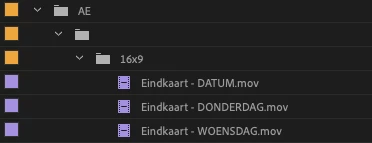
I can't figure out why it does this and how to avoid it. Hopefully someone can tell me how to fix this. Thanks!

This topic has been closed for replies.
Correct answer Bruce Bullis

The Folder object's getFiles() method should help; see Folder objects, in the JavaScript Tools Guide.pdf (which comes with ExtendScript Toolkit).


1 reply

Bruce Bullis
Legend
February 4, 2020

I think the issue gets introduced either in your projPath.slice(), or because you're importing an entire folder at once, rather than an array of specific files, within that folder. 

Do you get the additional nameless folder, if instead of passing importFiles() a folder, you instead pass it an array of file paths, to files within that folder?

edit2j47225339
Known Participant
February 26, 2020

Thanks for the reply, I didn't have much time to work on this lately but I'm back at it again. I tried importing an array (hard coded) of files and this seems to work fine. The only thing I'm wondering is how I could create the array of files in a folder without knowing the exact contents of the folder. (The folder could be either empty or it will have .mov files rendered from AE).

Bruce Bullis
Bruce BullisCorrect answer
Legend
February 26, 2020

The Folder object's getFiles() method should help; see Folder objects, in the JavaScript Tools Guide.pdf (which comes with ExtendScript Toolkit).