Abelhawk
Participating Frequently
March 10, 2025
Answered

Importing clips into the timeline only imports video, not audio - weird issue just started occuring

  • March 10, 2025
  • 3 replies
  • 470 views

I've never had this issue before, but just recently, when I drag an imported video clip onto the timeline, it only puts the video portion of the video onto it. The audio portion is left blank.


The only way to prevent this is to drag the video into a new sequence, which imports it correctly. So I've been able to use the annoying workaround of importing each clip into its own sequence, then copying and pasting it into the master sequence, then deleting the new sequence.


Did I accidentally check some box that caused this to happen? How do I fix this?

Correct answer MyerPj

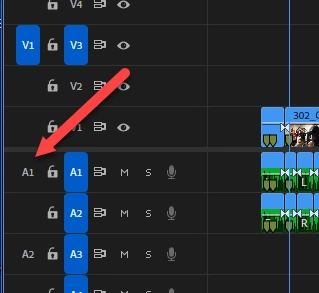
Track targeting possibly? Maybe you don't have an audio track targeted


3 replies

Abelhawk
AbelhawkAuthor
Participating Frequently
March 10, 2025

That was it! Must have accidentally untargeted all of them. I figured it was a dumb mistake with an easy fix. Thanks!

MyerPj
Community Expert
Community Expert
March 10, 2025

You're welcome. Well done! 🙂

IanB_360
Community Manager
Community Manager
March 10, 2025

updating status.

MyerPj
Community Expert
MyerPjCommunity ExpertCorrect answer
Community Expert
March 10, 2025

Track targeting possibly? Maybe you don't have an audio track targeted